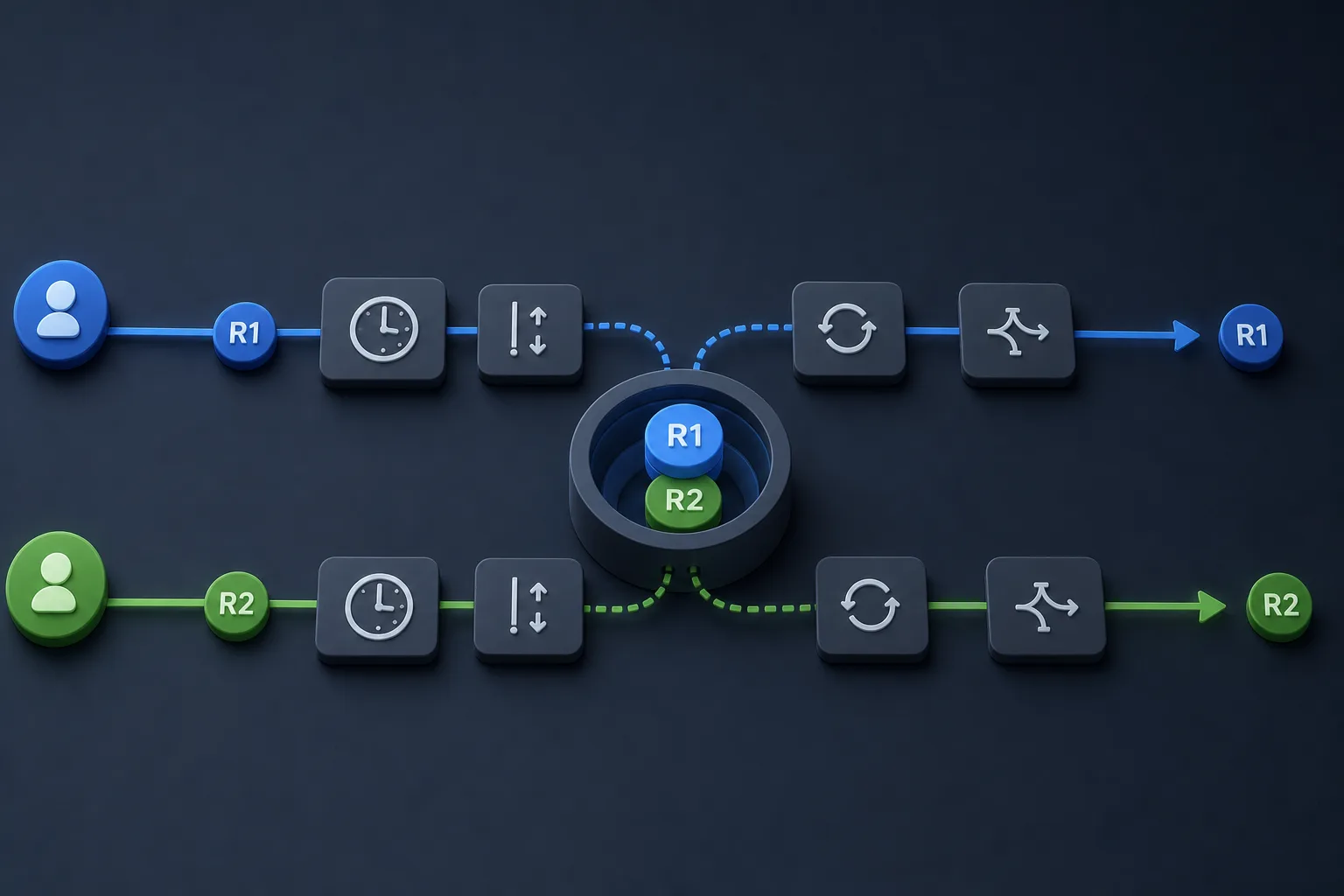
How does Node.js AsyncLocalStorage.run() isolate request context across concurrent async calls?
Use AsyncLocalStorage.run() to carry a request-scoped ID through overlapping async work, then verify the boundaries: nested restoration, outside-scope undefined results, thrown-error restoration, and the limits of context versus security isolation.
Node.js AsyncLocalStorage is easiest to misunderstand when it is described as “context that survives async calls.” That phrase is true, but it hides the boundaries that make the API safe to use. The useful question is narrower: if two requests overlap, why does each one still read its own ID instead of the last writer’s value?
The answer comes from the store’s scope. run(store, callback) establishes a context for the callback and for asynchronous operations created inside it; getStore() reads that context when the work resumes later. The supplied example keeps everything deterministic by using manually resolved promises, so the article can show the isolation boundary, the nested restoration rule, and the undefined outside-scope case without relying on timers or a server.
What AsyncLocalStorage gives each request
AsyncLocalStorage solves a narrow but practical problem: code that starts inside one logical request should be able to recover that request’s store later, even after the work has crossed asynchronous boundaries. The important part is not just that a value exists, but that the value follows the async chain that began inside run(). That is what makes a request ID, correlation token, or per-request logger behave consistently while concurrent work is in flight.
The Node 22 documentation is explicit about the shape of that contract. run(store, callback) runs a function synchronously within a context, the store is not accessible outside the callback, and asynchronous operations created within the callback can access it. That means the store is scoped to the call tree that begins in the callback, not to the whole process, not to the current thread forever, and not to any unrelated async task that happens to run later. If you need the same value elsewhere, you must establish a new context there too.
That scope is useful, but it is not a security boundary. It organizes access to contextual data, it does not hide secrets from code that already has a reference to them, and it does not automatically propagate into another process, another service, or some unrelated worker you did not create inside the callback. The correct mental model is ownership of request context, not magical system-wide identity.
import { AsyncLocalStorage } from 'node:async_hooks';

// This module exports three factory functions that create controllable
// async scenarios using the real Node.js v22 AsyncLocalStorage API.
// Nothing runs on import.

// Helper: create an externally-resolvable promise
function makeDeferred() {
  let resolve, reject;
  const p = new Promise((res, rej) => { resolve = res; reject = rej; });
  return { promise: p, resolve, reject };
}

// Each spawn* function returns an object with
// - controllers: the external resolvers the test will call to drive progress
// - finished: a promise that resolves when the async scenario completes or rejects if it throws
// - records: a promise that resolves to an array of observed store values in sequence

export function spawnRequest(asyncLocalStorage, id) {
  // Two manual async hops controlled from the outside
  const step1 = makeDeferred();
  const step2 = makeDeferred();

  // The recorded values observed inside the async run
  // We record at three moments: immediately inside run, after awaiting step1, after awaiting step2.
  const records = [];

  const finished = asyncLocalStorage.run(id, async () => {
    // immediately visible
    records.push(asyncLocalStorage.getStore());

    // create two promise-based async hops; the test resolves them to control interleaving
    await step1.promise;
    records.push(asyncLocalStorage.getStore());

    await step2.promise;
    records.push(asyncLocalStorage.getStore());

    return records;
  });

  // run() returns the callback's return value (a Promise here) synchronously
  // but it executes the callback and the contained async-await chain inside the provided store.
  return {
    controllers: { resolveStep1: step1.resolve, resolveStep2: step2.resolve },
    finished, // Promise that resolves to records
  };
}

export function spawnRequestWithNested(asyncLocalStorage, outerId, innerId) {
  // Demonstrates nested run() and restoration of the outer context after inner finishes
  const innerDone = makeDeferred();
  const records = [];

  const finished = asyncLocalStorage.run(outerId, async () => {
    records.push(asyncLocalStorage.getStore()); // outer visible

    // start a nested run synchronously inside the outer run
    // nested run should temporarily replace the store for its callback
    const nestedResult = asyncLocalStorage.run(innerId, () => {
      // inside nested callback
      records.push(asyncLocalStorage.getStore()); // should be innerId
      // wait for external signal to finish nested part
      return innerDone.promise.then(() => asyncLocalStorage.getStore());
    });

    // nestedResult is a promise that resolves after innerDone.resolve() is called
    const innerObserved = await nestedResult;
    records.push(innerObserved); // snapshot returned from nested callback

    // After nested run completes, the outer store should be restored for the remainder
    records.push(asyncLocalStorage.getStore()); // should be outerId again

    return records;
  });

  return {
    controllers: { completeInner: innerDone.resolve },
    finished,
  };
}

export function spawnRequestThatThrows(asyncLocalStorage, id) {
  // Demonstrates that if callback throws, context is exited / restored and the exception propagates
  const step = makeDeferred();
  const records = [];

  const finished = asyncLocalStorage.run(id, async () => {
    records.push(asyncLocalStorage.getStore());
    // wait for external signal, then throw
    await step.promise;
    throw new Error('boom-' + id);
  });

  return { controllers: { trigger: step.resolve }, finished, recordsPromise: Promise.resolve(records) };
}

// Small helper to demonstrate the pitfall of a shared mutable variable
export function runWithSharedVariable(shared, id, stepPromise) {
  // This is not using AsyncLocalStorage. It mutates a shared object and performs async hops.
  // The test will show this approach can interleave and leak values between concurrent requests.
  return (async () => {
    shared.value = id; // overwrite shared state
    const seenBefore = shared.value;
    await stepPromise; // yield to the event loop / other tasks
    const seenAfter = shared.value; // may have been changed by another concurrent request
    return [seenBefore, seenAfter];
  })();
}
SourcesNode.js v22 async_context: Class: AsyncLocalStorage (opens a new tab)
How the overlapping fixture shows isolation without timers
The overlapping-request fixture is deliberately small. It starts two logical requests, gives each one the same AsyncLocalStorage instance, and holds them at controlled promise boundaries so their continuations can be resumed in whichever order we choose. Because the promises are manually resolved, the result does not depend on the scheduler being slow enough or fast enough. The interleaving is part of the test design, not a lucky accident.
Inside each run() callback, the code records the store immediately, after the first await, and after the second await. That sequence matters because it proves the store is not only present at the beginning, when the callback runs synchronously, but also preserved across the asynchronous hops that would normally make request context easy to lose. The two requests can cross in the middle of their work, yet each continues to see its own store because each async chain belongs to the context created by its own run() call.
The important reading of this example is not just that the arrays end up as A, A, A and B, B, B. It is that the test compares a broken ownership model with the correct one. The shared variable version leaks the last writer. The AsyncLocalStorage version keeps the current request’s identity attached to the request that started it. That is the architectural boundary the article is actually about.
SourcesNode.js v22 async_context: Class: AsyncLocalStorage (opens a new tab)
Nested run() restores the outer context after the inner one finishes
Nested contexts are the next place where the contract becomes visible. If a function starts one request-scoped operation and, within it, starts another operation with a different store, the inner run() should temporarily replace the store for its own callback and then restore the outer store when it exits. That restoration is not an implementation detail. It is what keeps helpers from permanently stealing context from the caller.
The nested fixture demonstrates exactly that sequence. It begins with an outer store, enters an inner run(), records the inner value inside the nested callback, waits for an external signal, and then checks that the outer store is visible again after the inner async segment completes. The point of the test is not to show that nested contexts are possible in the abstract. The point is to show that context is lexical in the same sense that scope is lexical: the inner operation can use a different store without damaging the outer one.
That behavior is what makes small helper layers safe. A tracing wrapper can attach a request ID, call into a deeper helper that temporarily needs its own scope, and still return to the original request identity afterward. Without restoration, helpers would make context ownership brittle, and any nested utility would risk contaminating its caller.
SourcesNode.js v22 async_context: asyncLocalStorage.run(store, callback[, ...args]) (opens a new tab)
Outside the callback, and after a throw, the store is gone
Two boundaries matter just as much as the happy path. First, getStore() outside any active run() should return undefined. That is a feature, not a failure: it tells you that the code is not inside a request scope and should not pretend otherwise. If a helper depends on request identity, it should only read it when a surrounding scope has already established one.
Second, if the callback throws, the context is exited and the error is re-thrown by run(). That behavior keeps the context from leaking past its intended lifetime. The supplied throwing fixture pauses inside run(), then throws an error, and the test verifies both the rejection and the fact that getStore() is undefined afterward. In other words, a failed request does not leave behind a half-active scope for later code to stumble into.
These two boundaries are useful in real code because they keep failure modes honest. A missing context should read as missing, not as stale data from the last request. A thrown error should surface immediately to the caller, not be swallowed by the storage mechanism. That is why the API is useful for request-scoped data but not for smuggling state through arbitrary failure paths.
SourcesNode.js v22 async_context: asyncLocalStorage.run(store, callback[, ...args]) (opens a new tab)
What this API does not guarantee
It is easy to over-read a successful context example and assume too much. AsyncLocalStorage keeps a store coherent through asynchronous operations created within the callback, but it does not make context a form of authorization. Code that is allowed to read a store is still just code running in the same process. If a value must remain secret, treat it as a secret and apply the usual security boundaries instead of assuming context tracking will protect it.
The API also does not automatically extend into unrelated processes or independent jobs. If you fork work elsewhere, send a message to another service, or resume execution in a place that was not created inside the original run() callback, you must establish the boundary yourself. The store is associated with the async chain, not with your business concept of a request everywhere in your system.
Finally, the lower-level async_hooks documentation helps explain why this higher-level API exists. The docs recommend AsyncLocalStorage over createHook, AsyncHook, and executionAsyncResource for most context-tracking use cases, and they warn that executionAsyncId describes execution timing rather than causality. That distinction matters because a request-scoped ID is about the logical operation you meant to track, not merely the current execution tick.
SourcesNode.js v22 async_context: Class: AsyncLocalStorage (opens a new tab)Node.js v22 async_hooks: Async hooks and Promise execution tracking (opens a new tab)
How to read the example and choose the right API
The supplied implementation deliberately uses the stable AsyncLocalStorage API and avoids newer withScope or defaultValue-style features, because the article’s answer should rest on the documented run() and getStore() contract alone. That keeps the mechanism visible: establish a store, do work inside the callback, and read the store later from asynchronous continuations created inside that callback. Nothing in that model depends on hidden framework behavior or a low-level hook that has to be manually assembled.
The async_hooks documentation is still relevant, but mainly as a warning sign and a context for why not to drop down a layer too early. If your only goal is to keep a request ID attached to overlapping async work, AsyncLocalStorage is the API the Node docs steer you toward. Low-level hooks are for cases where you genuinely need the underlying resource tracing and are prepared to accept the complexity, safety risks, and performance implications that come with it.
The practical decision rule is simple. If you need one request-scoped value that follows async work, use run() and getStore(). If you need security isolation, interprocess boundaries, or a custom tracing system that goes beyond context tracking, you are solving a different problem and need a different design. The deterministic fixture in this article answers the first question completely and intentionally stops before pretending to answer the others.
import test from 'node:test';
import assert from 'node:assert/strict';
import { AsyncLocalStorage } from 'node:async_hooks';
import {
  spawnRequest,
  spawnRequestWithNested,
  spawnRequestThatThrows,
  runWithSharedVariable,
} from './main.mjs';

// Use a fresh AsyncLocalStorage instance for tests
const als = new AsyncLocalStorage();

test('AsyncLocalStorage.run isolates concurrent request contexts', async () => {
  // Start two overlapping requests A and B
  const a = spawnRequest(als, 'A');
  const b = spawnRequest(als, 'B');

  // At this point, both run callbacks have started synchronously and recorded the initial value.
  // Now interleave their async steps to prove isolation.

  // Allow A to pass its first await, then allow B to pass its first await in swapped order.
  a.controllers.resolveStep1();
  // wait microtask to ensure A progressed to await step2 before we resolve B's step1
  await Promise.resolve();

  b.controllers.resolveStep1();
  await Promise.resolve();

  // Now resolve step2 in the opposite order
  b.controllers.resolveStep2();
  await Promise.resolve();
  a.controllers.resolveStep2();

  const [arec, brec] = await Promise.all([a.finished, b.finished]);

  // Each request should have seen only its own id at all three checkpoints
  assert.deepEqual(arec, ['A', 'A', 'A']);
  assert.deepEqual(brec, ['B', 'B', 'B']);

  // getStore outside any run should be undefined
  assert.equal(als.getStore(), undefined);
});

test('Nested run restores outer context after inner completes', async () => {
  const s = spawnRequestWithNested(als, 'OUTER', 'INNER');

  // Let nested run proceed to its waiting point and capture state
  // (the nested run is waiting on completeInner)
  await Promise.resolve();

  // Now finish the nested run
  s.controllers.completeInner();

  const records = await s.finished;

  // Expected sequence inside outer run:
  // 0: outer store visible at start
  // 1: inner store visible inside nested run
  // 2: the nested run returned the inner store snapshot
  // 3: after nested run, outer store is restored
  assert.deepEqual(records, ['OUTER', 'INNER', 'INNER', 'OUTER']);

  // still outside any run
  assert.equal(als.getStore(), undefined);
});

test('Exception in run exits and restores context', async () => {
  const t = spawnRequestThatThrows(als, 'X');

  // allow the run to start and then trigger the throw
  await Promise.resolve();
  t.controllers.trigger();

  // finished promise should reject due to thrown error
  await assert.rejects(async () => { await t.finished; }, {
    message: 'boom-X',
  });

  // After the throw, getStore must be undefined (context exited)
  assert.equal(als.getStore(), undefined);
});

test('Shared mutable variable approach fails under interleaving (demonstrates need for ALS)', async () => {
  // This test shows why a plain shared mutable variable is insufficient.
  const shared = { value: undefined };
  const step1 = (async () => {
    // create a promise the two runs will both await; we control order by resolving later
    const d = [];
    return Promise.all(d);
  })();

  // Instead create two deferreds for manual control
  function deferred() {
    let r;
    const p = new Promise(res => { r = res; });
    return { p, r };
  }

  const d1 = deferred();
  const d2 = deferred();

  const pA = runWithSharedVariable(shared, 'A', d1.p);
  // allow pA to set shared.value = 'A' before we start B
  await Promise.resolve();

  const pB = runWithSharedVariable(shared, 'B', d2.p);
  await Promise.resolve();

  // Now resolve B first, which will overwrite the shared.value before A continues
  d2.r();
  await Promise.resolve();
  d1.r();

  const [rA, rB] = await Promise.all([pA, pB]);

  // rA saw 'A' before awaiting, but after awaiting it may see 'B' because shared variable was overwritten.
  assert.equal(rA[0], 'A');
  // The after value for A should be 'B' (demonstrating leakage), not 'A'.
  assert.equal(rA[1], 'B');

  // B saw its own value before and after
  assert.equal(rB[0], 'B');
  assert.equal(rB[1], 'B');

  // In contrast, AsyncLocalStorage preserves per-request values even when interleaved (covered above).
});
SourcesNode.js v22 async_hooks: Async hooks overview and promise execution tracking (opens a new tab)Node.js v22 async_context: Class: AsyncLocalStorage (opens a new tab)