How do you rerun only failed GitHub Actions jobs without rerunning the whole workflow?
Choose the narrowest GitHub Actions rerun scope, confirm the 30-day and permission boundaries, and verify the rerun against the original run context.
A workflow run can fail for one job while the rest of the pipeline already proved useful work. Rerunning the whole workflow repeats the successful jobs and makes it harder to see which failure still matters.
This runbook shows when to rerun the whole run, when to rerun only the failed jobs, and when to rerun a single job. The examples use GitHub's documented rerun commands and a local Node fixture that proves the command selection without talking to GitHub.
Choose the smallest rerun that matches the failure
GitHub Actions exposes three recovery scopes for a failed run: rerun the entire workflow run, rerun all failed jobs in that run, or rerun one specific job. The useful choice is the narrowest scope that can still reproduce the problem you are trying to recover.
If lint, build, and test all passed but one deploy job failed because a runner or secret was unavailable, rerun the failed job first. If multiple jobs failed for the same reason, rerun the failed jobs. Save the full rerun for cases where the workflow boundary itself needs to be repeated.
That order matters because a rerun is not free. It consumes queue time, can trigger rate limits on external systems, and can obscure which job actually needs attention if everything is retried at once. A narrow rerun also keeps the evidence sharper: a second failure in the same single job is easier to compare with the original run than a wall of repeated green jobs around one red one.
The opposite edge case exists too. If the failure was caused by a shared setup step that every job depends on, rerunning only one failed job can be misleading because the job may still be the wrong slice of the workflow. In that case, the rerun scope should match the shared dependency, not the cosmetic location of the red X in the UI.
| Symptom | Recommended rerun |
|---|---|
| One job failed and the others already succeeded | Rerun the failed job or failed jobs |
| Several jobs failed for the same transient reason | Rerun failed jobs |
| You need to repeat the whole workflow against the same commit and ref | Rerun the full workflow run |
SourcesGitHub Docs: Re-running workflows and jobs (opens a new tab)GitHub CLI manual: gh run rerun (opens a new tab)
Confirm the permission and time window before rerunning
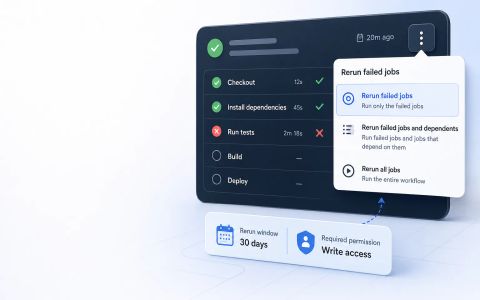
GitHub says reruns use the privileges of the actor who initially triggered the workflow, not the person who clicks rerun. It also limits reruns to 30 days after the original run. That means a maintainer who has access now may still be blocked if the original actor could not have executed the same workflow step.
The rerun keeps the original `GITHUB_SHA` and `GITHUB_REF`. That is useful because the rerun validates the same revision, but it also means the rerun is not a substitute for editing the workflow file or switching to a different branch.
Those boundaries are part of the decision, not a footnote. If the original actor lacked a required environment or repository permission, the rerun can fail again for the same reason even though the current operator can see more of the repository. The runbook therefore treats rerun eligibility as a preflight check, not a reaction after the second failure.
Similarly, a rerun outside the 30-day window is not a subtle failure mode. It is a hard boundary that should send you to a different recovery path, such as rebuilding the workflow with a fresh push or inspecting the archived run history instead of assuming the old run is still replayable.
SourcesGitHub Docs: Re-running workflows and jobs (opens a new tab)
Use the GitHub UI or the matching CLI command
In the GitHub UI, the Re-run jobs menu exposes the same scopes as the documentation: rerun all jobs, rerun failed jobs, or rerun a single job from the Jobs section. For a repeatable operator workflow, the CLI makes the decision explicit.
Use `gh run rerun RUN_ID` for a full rerun, `gh run rerun RUN_ID --failed` for only the failed jobs, and `gh run rerun --job JOB_ID` for one job. If you omit the run ID, GitHub CLI opens an interactive menu of recent failed runs, which is handy for humans but not ideal for automation.
The command itself is not the policy. The policy is the choice you make before you type it. For a release engineer on call, the policy question is whether the broken behavior was isolated to one job or shared across the run. The command is simply the executable form of that decision, which is why the article keeps the mapping visible rather than burying it in prose.
A second operational edge case is an in-progress rerun that gets superseded by a newer push. In that situation, a rerun may still complete, but it no longer answers the same question the original failure did. The right interpretation is to compare the rerun against the same run ID and commit, then decide whether the current branch tip needs a new workflow run instead of more retries.
gh run rerun RUN_ID

gh run rerun RUN_ID --failed

gh run rerun --job JOB_IDSourcesGitHub Docs: Re-running workflows and jobs (opens a new tab)
Verify the rerun against the same run context
A rerun is useful because it keeps the same commit and ref as the original event. If the rerun now passes, you have confirmed that the same workflow context can succeed today. If it still fails, the failure is likely still present or still reachable in that same context.
The run summary is the place to compare the original failure and the rerun result. Do not treat a rerun exit status as the only signal. You still need the run ID, the job name, and the same commit SHA to know whether you actually repeated the right work.
The most useful evidence is a before-and-after pair for the exact failing job. If the rerun passes, compare the setup output and the failing step's inputs with the original run so you can tell whether the cause was environment drift, a transient dependency, or a code change that happened in the meantime. If the rerun fails in the same step with the same inputs, the failure is now much easier to classify.
SourcesGitHub Docs: Re-running workflows and jobs (opens a new tab)
Know what the rerun does not prove
A rerun does not change the workflow file, the runner labels, or the secret set by itself. If the rerun passes because you changed the environment between attempts, the rerun only proves the current environment is better, not that the original failure was transient.
For release work, that difference matters. A rerun can be the right operator action and still leave a real workflow regression in place. Treat the rerun as recovery, then decide whether the failure needs a code or configuration change.
Two practical limits are worth stating explicitly. First, reruns do not repair a broken secret, missing runner label, or changed environment variable unless something outside the rerun changed. Second, reruns do not tell you whether the workflow would fail under a different branch tip. They are useful because they reduce noise around the original event, not because they prove the entire pipeline is healthy forever.
The best recovery habit is to ask after every rerun: what did this prove, and what did it leave unanswered? If the answer is only that the same job can pass now, keep investigating until you know whether the failure was transient, permissions-related, or a deterministic workflow bug.
SourcesGitHub Docs: Re-running workflows and jobs (opens a new tab)