When should I use Docker build secrets vs runtime secrets so credentials never end up in images?
Choose the right Docker secret mechanism by separating build-time access from runtime access, then verify that secret values do not appear in image layers or environment variables.
Docker gives you two different secrecy problems, and they deserve two different answers. A build step may need temporary access to a private dependency source, while a running container may need a token or certificate after the image already exists. If you use the same mechanism for both, you risk putting a credential where the image can keep it longer than you intended.
This article stays within the documented paths that keep that boundary visible: build secrets and SSH mounts for build-time access, and Compose secrets for runtime file-backed access. It also shows the wrong path on purpose, because build arguments and environment variables are exactly the things Docker warns you not to use for secrets when the goal is to keep them out of image layers and metadata.
Start with the lifetime of the credential, not the word “secret”
The question behind this article sounds simple, but it hides two different lifetimes. One credential may only need to exist while an image is being assembled. Another may need to exist after the image has already been built, when the container starts and reads its configuration. Docker documents different mechanisms for those two cases, and the distinction matters because the wrong mechanism can leave sensitive data in the image instead of keeping it transient.
The safest way to think about the problem is to ask where the secret is allowed to exist. If the build process needs it only long enough to fetch a private dependency or authenticate to a source, the secret belongs in the build phase and should disappear once that step finishes. If the application needs the value at runtime, the container should receive it as a mounted file through Compose, not as a value baked into the image. Those are different ownership models, even though both involve sensitive data.
Docker’s documentation draws the same boundary. Build secrets are for the build, and Compose secrets are for services that run containers. The build guide explicitly warns that build arguments and environment variables are inappropriate for secrets because they persist in the final image. The Compose guide likewise warns against storing passwords and API keys in environment variables because they are easy to leak into logs or make visible to too many processes. That gives the decision a practical shape: choose the mechanism by the lifetime of the credential, not by the convenience of the command line.
- Build secrets answer the question: does a build step need temporary access to a credential?
- Compose secrets answer the question: does a running service need a file-backed secret at runtime?
- Build args and ENV answer a different question: what non-sensitive configuration should become part of the image or container metadata?
export function chooseDockerSecretMechanism({ needsDuringBuild, needsDuringRuntime, credentialType = 'file' } = {}) {
  if (needsDuringBuild && needsDuringRuntime) {
    return {
      recommendation: 'split',
      reason: 'Use a build secret or SSH mount during image construction, and a Compose secret at runtime.',
    };
  }

  if (needsDuringBuild) {
    if (credentialType === 'ssh') {
      return {
        recommendation: 'build-ssh-mount',
        reason: 'SSH credentials used during a build should use --ssh and RUN --mount=type=ssh.',
      };
    }

    return {
      recommendation: 'build-secret',
      reason: 'Temporary build-time credentials should use --secret and RUN --mount=type=secret.',
    };
  }

  if (needsDuringRuntime) {
    return {
      recommendation: 'compose-secret',
      reason: 'A running container should read a file-backed secret mounted by Docker Compose at /run/secrets/<name>.',
    };
  }

  return {
    recommendation: 'plain-config',
    reason: 'If the value is not sensitive and is not needed for build or runtime secret access, use ordinary configuration instead.',
  };
}

export function classifyDockerfileLine(line) {
  const text = String(line).trim();

  if (/\bRUN\b.*--mount=type=secret\b/.test(text)) {
    return 'build-secret-mount';
  }
  if (/\bRUN\b.*--mount=type=ssh\b/.test(text)) {
    return 'build-ssh-mount';
  }
  if (/^\s*(ENV|ARG)\b/i.test(text) && /(TOKEN|PASSWORD|SECRET|KEY)/i.test(text)) {
    return 'persistent-secret-risk';
  }
  return 'other';
}
SourcesDocker Build secrets (opens a new tab)Docker Compose secrets (opens a new tab)
Build-time secrets belong only to the instruction that needs them
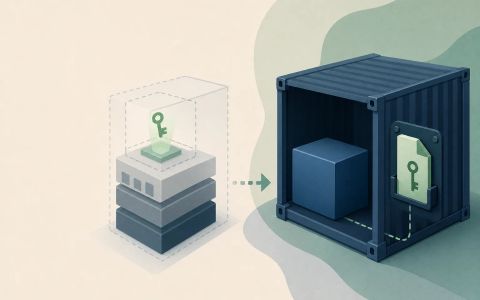
Docker’s build-time model has two documented options. The general-purpose option is a secret mount, and the specialized option is an SSH mount. Both expose credentials only for the duration of the build instruction that needs them. That makes them appropriate for tasks such as downloading private packages, authenticating to an artifact server, or fetching a private repository during image construction.
The important part is not merely that the build succeeds; it is that the credential is never meant to become part of the resulting image. Docker’s build secrets documentation describes secret mounts as a temporary source available to the build container, while SSH mounts are intended for SSH agent sockets or keys. The Git authentication section adds another layer: when the build itself starts from a private remote Git context, the builder may need pre-flight credentials before any `RUN` instruction executes. That is why `GIT_AUTH_TOKEN` and `GIT_AUTH_HEADER` are separate from ordinary secret mounts. They are there so the builder can fetch the context or remote `ADD` source without you embedding credentials in the Dockerfile.
This is the main reason the article distinguishes build-time from runtime secrets. A build-time credential should be consumed by the build step and then disappear. It should not be rewritten into an `ENV` instruction, copied into the image filesystem, or turned into a default value for the resulting container. The documented build-secret flow is intentionally narrow: pass the secret to the build, mount it in the instruction that needs it, and keep it out of the image layers and metadata.
- Use `docker build --secret` to pass a secret into the build command.
- Consume that secret in the Dockerfile with `RUN --mount=type=secret`.
- Use `--ssh` and `RUN --mount=type=ssh` when the credential is an SSH socket or key.
- For remote private Git contexts, use the documented pre-flight secrets such as `GIT_AUTH_TOKEN` or `GIT_AUTH_HEADER`.
Compose runtime secrets are file mounts, not environment variables
Compose solves a different problem. After the image exists, the running service may still need a password, token, or certificate. The Compose guide says that a secret is mounted as a file inside the container at `/run/secrets/<secret_name>`, and that services only receive the secrets they are explicitly granted. That makes the runtime path narrower than a blanket environment variable, because the secret is available only to the container that declares it and only as a file.
That file-backed model is useful when the application itself reads the value after startup. A database container can consume a password file. A web service can read an API key or credential file. The image does not need to know the secret at build time, and the secret does not need to be inserted into the image’s configuration. The service definition becomes the access control point: if the service does not list the secret, it does not receive it.
There is still application responsibility here. Compose can mount the file, but it cannot stop your process from logging it, copying it into another directory, or exposing it through debugging output. The article’s claim is therefore deliberately narrower than a full security guarantee: Compose secrets help keep credentials out of the image and out of broad environment-variable exposure, but the application still has to read and handle the file responsibly. That limitation is part of the answer, not a footnote.
- Define the secret at the top level of the Compose file.
- Attach the secret only to the service that needs it with the `secrets` attribute.
- Read the secret from `/run/secrets/<secret_name>` inside the container.
- Remember that Compose secrets are supported on Linux containers only.
Build arguments and ENV solve a different problem, and they fail the secret test
The easiest failure to recognize is the one Docker warns about directly. If you pass a credential through a build argument or set it in an `ENV` instruction, the value is no longer temporary. It can persist in the image configuration, show up in history, or survive long after the build step that used it. That persistence is exactly what you do not want when the requirement is to keep credentials out of images.
This is why a successful build is not the same thing as a safe build. The command can finish, the application can run, and the image can still be disqualified because the secret became part of the recorded image state. A reviewer should inspect the resulting image with the tools Docker already provides. `docker history` is useful because it shows the command trail that produced each layer. `docker image inspect` is useful because it exposes image configuration, including environment values. If either inspection reveals the secret text, the policy has already failed.
The article uses that contrast as an important teaching point. Build secrets and runtime secrets are not only different APIs; they are different promises. The build-secret path promises temporary access during one instruction. The Compose-secret path promises file-backed access to a service at runtime. Build args and ENV promise neither of those things; they are ordinary configuration mechanisms, and Docker documents them as the wrong choice for secrets when persistence in the image is unacceptable.
- A build can pass and still violate the secret policy if the credential appears in image history or config.
- `docker history` is the first place to inspect for command strings or metadata trails.
- `docker image inspect` helps check whether the final image configuration carries a value you meant to keep out of it.
- A passing build is not evidence that the secret stayed out of the image.
import test from 'node:test';
import assert from 'node:assert/strict';
import { chooseDockerSecretMechanism, classifyDockerfileLine } from './main.mjs';

test('chooses a build secret when the credential is only needed during image construction', () => {
  const result = chooseDockerSecretMechanism({ needsDuringBuild: true, needsDuringRuntime: false });

  assert.equal(result.recommendation, 'build-secret');
  assert.match(result.reason, /build-time credentials/i);

  const line = 'RUN --mount=type=secret,id=npm_token npm ci';
  assert.equal(classifyDockerfileLine(line), 'build-secret-mount');
});

test('chooses a Compose secret when the running container needs a file-backed secret', () => {
  const result = chooseDockerSecretMechanism({ needsDuringBuild: false, needsDuringRuntime: true });

  assert.equal(result.recommendation, 'compose-secret');
  assert.match(result.reason, /Compose/i);

  const line = 'services:\n  app:\n    secrets:\n      - db_password';
  assert.equal(classifyDockerfileLine(line), 'other');
});

test('flags persistent secret-like ENV or ARG usage instead of pretending it is safe', () => {
  const envLine = 'ENV NPM_TOKEN=abcdef0123456789';
  const argLine = 'ARG API_KEY=shh-please-dont-bake-this';

  assert.equal(classifyDockerfileLine(envLine), 'persistent-secret-risk');
  assert.equal(classifyDockerfileLine(argLine), 'persistent-secret-risk');
});

test('splits the recommendation when both build-time and runtime access are required', () => {
  const result = chooseDockerSecretMechanism({
    needsDuringBuild: true,
    needsDuringRuntime: true,
    credentialType: 'ssh',
  });

  assert.equal(result.recommendation, 'split');
  assert.match(result.reason, /build secret or SSH mount/i);
  assert.match(result.reason, /Compose secret/i);
});
SourcesDocker Build secrets (opens a new tab)Docker Compose secrets (opens a new tab)
The decision chart is small, but the limits matter
The decision is simple once the ownership boundary is visible. If the credential is needed only while the image is built, use a build secret. If the credential is an SSH credential, use an SSH mount. If the credential is needed by the running service, use a Compose secret. If the value is not sensitive, ordinary configuration may be fine. The article does not need a more complicated rule than that, because the official documentation already separates the build-time and runtime paths.
What matters most is that each option solves a different lifetime problem. A build secret is meant to disappear after the instruction finishes. A Compose secret is meant to be read from a file by a service that explicitly requested it. Neither mechanism automatically fixes application behavior after the secret is delivered. The application can still cache the value, log it, or write it somewhere else. Docker cannot make that decision for you.
That is why the verification story belongs beside the mechanism. For build secrets, inspect the final image for the absence of the secret string in history and configuration. For Compose secrets, check that the secret appears only as a mounted file in the service that was granted access. Those checks do not prove every downstream behavior, but they do prove that Docker delivered the credential through the documented path and did not bake it into the image by mistake. That is the practical standard this article is aiming for.
The one claim to avoid is the generic runtime phrase “Docker secrets.” The supplied sources support Docker Build secrets and Docker Compose secrets. In this article, runtime secrets therefore means Compose secrets: file-backed values mounted into a service container through Compose. Keeping that language precise prevents the article from promising a broader mechanism than the sources actually describe.
- Use build secrets for temporary build access.
- Use Compose secrets for runtime file-backed access.
- Use SSH mounts when the credential is an SSH key or socket.
- Use ordinary configuration only when the value is not sensitive.
SourcesDocker Build secrets (opens a new tab)Docker Compose secrets (opens a new tab)
Use the mechanism that matches the lifetime of the credential
The cleanest way to remember the answer is to think in phases. During the build, Docker secrets should be temporary inputs that help the build complete without leaving credentials behind. During runtime, Compose secrets should be file-backed inputs for the specific service that needs them. If the same credential is needed in both phases, do not force one mechanism to do both jobs. Split the responsibility so the build consumes a build secret and the container consumes a runtime secret file.
That split makes the failure modes easier to reason about too. If a build argument or `ENV` value is wrong, the risk is not merely that the build fails; it is that the secret may be recorded in the image state. If a Compose secret is misconfigured, the service may simply not see the file or may see the wrong file. Those are different problems, and they are easier to diagnose when the mechanism matches the lifetime of the credential.
The practical takeaway is small but strict: never choose convenience over persistence. When the credential should not survive into the image, do not put it into build arguments or environment variables. When the running container needs access, give it a file through Compose, not a broad environment variable. That is the narrowest answer the documentation supports, and it is enough to keep the article honest about both the mechanism and its limits.
- Separate the build phase from the runtime phase.
- Use the temporary build secret path when the build needs private access.
- Use the Compose secret path when the running service needs a file.
- Treat the final image as the thing you are trying not to contaminate with credentials.
SourcesDocker Build secrets (opens a new tab)Docker Compose secrets (opens a new tab)