How can I reliably reuse cache mounts for dependency installs across multi-stage Dockerfiles?
Reuse dependency-download caches across multi-stage Dockerfiles by giving `RUN --mount=type=cache` an explicit, valid target and understanding that mount persistence is separate from layer cache reuse.
When a Docker build slows down after a small source change, it is easy to say that “the cache did not work.” That sentence is usually too vague to help. Docker has at least two relevant mechanisms: instruction and layer cache reuse, and the persistent directory behind a cache mount. They solve different problems, and they fail for different reasons.
This article keeps the question narrow: how can you reliably reuse cache mounts for dependency installs across multi-stage Dockerfiles? The answer is to use Docker's documented cache-mount contract, treat the target path as the default identity, and keep layer reuse separate from mount persistence instead of assuming they are the same thing.
Why the fix starts with a builder contract
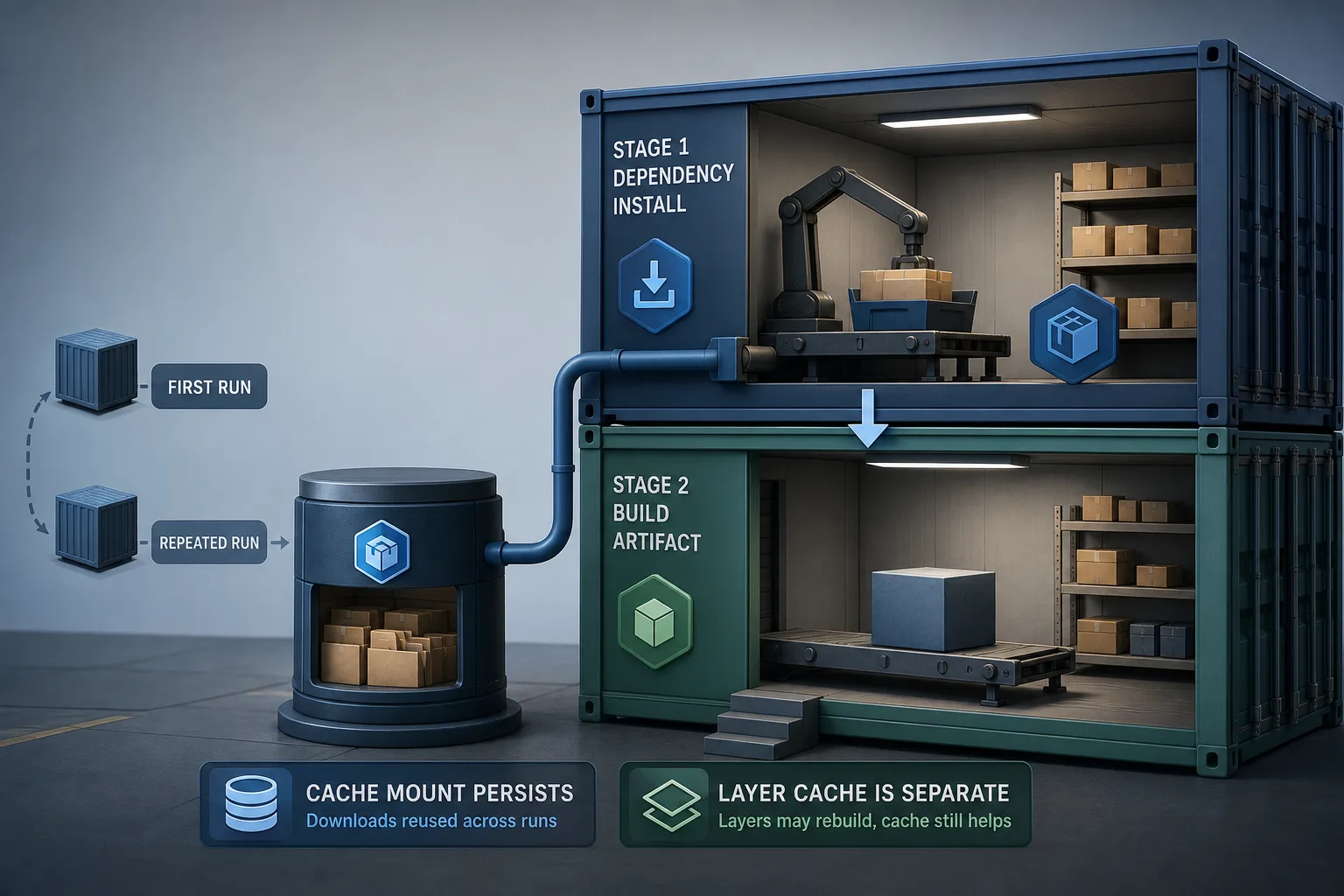
The reliable way to think about this problem is to separate two kinds of cache behavior that often get blurred together. Docker layer cache decides whether an instruction has to run again at all. A cache mount decides what directory is available to that instruction if it does run. Those mechanisms are related, but they are not the same thing, and they do not fail for the same reasons.
The documentation for `RUN --mount=type=cache` is explicit about the mount being a persistent cache directory for build steps. It also says the mount's `id` defaults to the `target` path, and that the supported sharing values are `shared`, `private`, and `locked`. That is the contract this article uses. It does not try to infer cache identity from a stage name, the base image, or `WORKDIR`, because Docker does not define cache-mount identity that way.
That distinction matters in a multi-stage Dockerfile. A source edit may invalidate a later layer, which means the dependency install runs again. When that happens, the cache mount can still reduce the cost by preserving package data. The useful question is therefore not whether Docker will magically reuse a stage name. The useful question is whether the mount declaration is valid, stable, and aligned with the package manager's actual cache path.
The revised helper in the accompanying example follows that boundary. It validates the fields Docker documents, emits the mount declaration exactly, and keeps the default identity equal to the target path. That gives you a configuration object you can reason about without pretending to prove builder behavior from a Node test.
const SHARING_VALUES = new Set(['shared', 'private', 'locked']);
const SAFE_COMPONENT = /^[A-Za-z0-9_./-]+$/;

export function validateCacheMountInput({ target, id, sharing = 'shared' } = {}) {
  if (typeof target !== 'string' || target.length === 0) {
    throw new TypeError('target must be a non-empty string');
  }
  if (!target.startsWith('/')) {
    throw new RangeError('target must be an absolute path');
  }
  if (!SAFE_COMPONENT.test(target)) {
    throw new RangeError('target must contain only letters, digits, slash, dot, underscore or hyphen');
  }

  if (id !== undefined) {
    if (typeof id !== 'string' || id.length === 0) {
      throw new TypeError('id must be a non-empty string when provided');
    }
    if (!SAFE_COMPONENT.test(id)) {
      throw new RangeError('id must contain only letters, digits, slash, dot, underscore or hyphen');
    }
  }

  if (!SHARING_VALUES.has(sharing)) {
    throw new RangeError('sharing must be one of shared, private, locked');
  }
}

export function buildCacheMountOptions({ target, id, sharing = 'shared' } = {}) {
  validateCacheMountInput({ target, id, sharing });
  return { type: 'cache', target, id: id ?? target, sharing };
}

export function formatRunMount(options) {
  const { type, target, id, sharing } = buildCacheMountOptions(options);
  return `--mount=type=${type},target=${target},id=${id},sharing=${sharing}`;
}
SourcesDockerfile reference: RUN --mount=type=cache (opens a new tab)Docker Build cache optimization (opens a new tab)
What the helper validates and why that is enough
The provided implementation is intentionally narrow. `validateCacheMountInput()` checks that `target` is a non-empty absolute path, that an explicit `id` is a non-empty string when it is supplied, and that `sharing` is one of Docker's documented values. `buildCacheMountOptions()` then returns the exact shape needed for a cache mount, and `formatRunMount()` renders the `--mount=type=cache,...` fragment that would appear in a Dockerfile instruction.
That is enough because the article is about producing a correct cache-mount declaration, not about simulating BuildKit internals. A configuration helper can guarantee that the mount path is explicit, the default id matches the target path, and the sharing mode is valid. It cannot guarantee that a particular builder instance persists storage between jobs, because that depends on the builder backend and the surrounding environment.
The validation rules are deliberately stricter than Docker's full path grammar. The helper accepts only letters, digits, slashes, dots, underscores, and hyphens. That restriction is an application policy chosen to keep the emitted mount fragment free from commas, whitespace, shell operators, or other characters that could break the flag syntax or introduce another option. The helper therefore protects the string it emits, while still leaving broader naming schemes to a separately reviewed configuration path if a project needs one.
This boundary is important in practice. A helper should prevent malformed mount declarations and keep the cache identity stable. It should not pretend to prove that the builder will reuse data across a fresh CI machine, because Docker's documentation says cache mounts live in the builder's local storage and are not restored from exported build cache.
SourcesDockerfile reference: RUN --mount=type=cache (opens a new tab)Docker Build cache invalidation (opens a new tab)
How the default id behavior keeps the mount predictable
One of the easiest mistakes to make is to invent a cache identity model that Docker never promised. The documentation says the `id` option defaults to the mount's `target` path. That default is not an implementation detail to ignore; it is the simplest stable identity the builder already understands. If the mount target is `/root/.cache/pip`, the mount id can also be `/root/.cache/pip` unless you have a reason to separate it.
Mirroring that rule in the helper gives a useful default for multi-stage builds. The dependency-install stage can mount the package manager's real cache path, and the build keeps working even if the layer is invalidated by a source change. You do not need a second naming convention just to make the cache exist. In many builds, the target path is already the most readable and least surprising id you can use.
Explicit ids still have a place. They are useful when multiple steps would otherwise collide on a shared path, or when a team wants two logically separate caches at the same target shape. For example, two different install tools might happen to use a similar directory layout but should not share mutable data. In that case, the explicit id separates the caches without changing the mount location.
What the default does not do is make unrelated stage changes matter. A stage name change, a different base image, or a different `WORKDIR` does not redefine the mount identity by itself. Those changes can affect instruction cache reuse if they change the instruction text or the files it depends on, but the cache-mount namespace remains the mount declaration itself.
SourcesDockerfile reference: RUN --mount=type=cache (opens a new tab)Docker Build cache optimization (opens a new tab)
A multi-stage Yarn pattern that keeps the cache mount honest
A multi-stage Dockerfile for a JavaScript project usually works best when the dependency stage owns the expensive download path and the later stage handles the application build. The article's example follows that structure: one stage installs dependencies with a cache mount pointed at the package manager's actual cache directory, and a later stage copies in the source and performs the build. The important part is not the exact tool name. The important part is that the cache mount is attached to the step that can benefit from downloaded packages being reused.
For Yarn or npm, the cache mount target should match the package manager's cache location, not an arbitrary directory chosen for convenience. Docker's optimization guide explicitly treats cache mounts as a way to speed up steps that install packages because unchanged packages can be reused even if the layer has to run again. That is the right mental model for multi-stage builds: the mount reduces repeated download cost, while the layer boundary still protects the rest of the image from unnecessary rebuild work.
`sharing=locked` is the safer choice when the tool expects exclusive access to the cache files. Docker documents the mode as the one that pauses the second writer until the first releases the mount. That is useful for package managers with file-level locking expectations, especially in concurrent builds or shared CI runners. `shared` and `private` remain valid options when the workload and the builder topology make them appropriate, but they should be chosen deliberately rather than left implicit.
This pattern also makes the limits visible. If the same builder and its local cache storage are available on the next run, the dependency cache can persist and save downloads. If the runner is ephemeral, the mount starts empty again, even though the Dockerfile is correct. That is not a syntax problem; it is an infrastructure constraint.
SourcesDocker Build cache optimization (opens a new tab)Dockerfile reference: RUN --mount=type=cache (opens a new tab)
What the Node tests prove, and what they do not
The unit tests in the example intentionally stop at the configuration boundary. They verify that an explicit id is preserved, that the default id becomes the target path when omitted, that the default sharing mode is `shared`, and that invalid targets, ids, and sharing values are rejected. Those checks are enough to show that the helper emits a legal cache-mount declaration and protects against malformed input.
That test suite does not try to prove Docker builder persistence. It cannot show that BuildKit will keep a mount across machines, that a CI runner has persistent local storage, or that a cache survives garbage collection. The Docker documentation is clear that cache mounts live in the builder's local storage and are not exported with `--cache-to` or restored with `--cache-from`. That means the runtime property the reader cares about depends on the builder environment, not on a Node unit test.
Keeping the proof boundary narrow is a feature, not a weakness. The article answers the question by separating what the Dockerfile can guarantee from what the surrounding infrastructure must provide. The helper ensures that the mount declaration is correct. The tests ensure that the helper keeps that contract. The real builder is still the thing that decides whether mount contents are present on the next run.
That separation is also why the article avoids overclaiming about “reliable reuse.” Reliability here means having a mount declaration that is stable, valid, and aligned with the package manager's cache path. It does not mean every environment will preserve builder storage forever. If the builder is ephemeral, the mount can still be correct and still start empty on each job.
import test from 'node:test';
import assert from 'node:assert/strict';
import { buildCacheMountOptions, formatRunMount, validateCacheMountInput } from './main.mjs';

test('builds exact cache mount options for an explicit ID', () => {
  const options = { id: 'yarn-deps', target: '/usr/local/share/.cache/yarn', sharing: 'locked' };
  assert.deepEqual(buildCacheMountOptions(options), { type: 'cache', ...options });
  assert.equal(
    formatRunMount(options),
    '--mount=type=cache,target=/usr/local/share/.cache/yarn,id=yarn-deps,sharing=locked'
  );
});

test('defaults id to target path and sharing to shared', () => {
  assert.deepEqual(buildCacheMountOptions({ target: '/root/.cache/pip' }), {
    type: 'cache',
    target: '/root/.cache/pip',
    id: '/root/.cache/pip',
    sharing: 'shared',
  });
});

test('rejects a relative target and an unsupported sharing mode', () => {
  assert.throws(() => buildCacheMountOptions({ target: 'relative/cache' }), RangeError);
  assert.throws(() => validateCacheMountInput({ target: '/cache', sharing: 'exclusive' }), RangeError);
});

test('rejects option-injection characters in target and id', () => {
  assert.throws(() => formatRunMount({ target: '/cache,id=other' }), RangeError);
  assert.throws(() => formatRunMount({ target: '/cache', id: '/cache path' }), RangeError);
});

test('rejects empty or non-string explicit IDs instead of silently defaulting', () => {
  for (const id of ['', null, 0, false, {}]) {
    assert.throws(() => formatRunMount({ target: '/cache', id }), TypeError);
  }
});
SourcesDockerfile reference: RUN --mount=type=cache (opens a new tab)Docker Build cache invalidation (opens a new tab)
Where the boundaries stay visible
Two limits matter most after you adopt cache mounts in a multi-stage build. First, cache mounts are not the same as exported build cache. Docker says their contents are stored in the builder's local storage, are not included in exported build cache, and are not restored by build cache import. If your CI creates a fresh builder for every job, the cache mount will begin empty unless some other mechanism preserves builder storage.
Second, a cache mount does not cancel Docker's ordinary invalidation rules. If a dependency manifest changes, the install step should run again. That is correct behavior. The mount simply makes the rerun cheaper because package data can already be present. Likewise, if a source file changes in a later stage, only the affected instructions should rebuild; the presence of a cache mount does not make unrelated steps immune to invalidation.
The practical decision rule is therefore modest. Use a cache mount when a step repeatedly downloads package data that can be reused. Point the mount at the real package-manager cache directory. Let the default `id` equal the target path unless you need a separate namespace, and choose `sharing=locked` when the package manager expects exclusive access. Then treat layer reuse and mount persistence as separate mechanisms with different guarantees.
That framing avoids the most common failure mode: expecting one cache mechanism to solve a problem belonging to another. Docker layer cache can skip work. Cache mounts can reduce repeat download cost. External cache can share layers across builders. A reliable setup may use all three, but the article's answer is specifically about making the mount declaration itself correct and predictable.
SourcesDocker Build cache optimization (opens a new tab)Docker Build cache invalidation (opens a new tab)Dockerfile reference: RUN --mount=type=cache (opens a new tab)