How do I update a service worker cache and delete old versions safely?
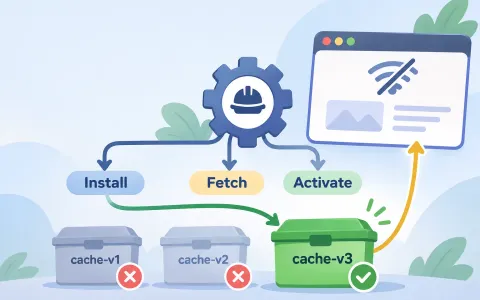
Version cache names with the worker revision, use Cache.match() for the current offline response, and delete only obsolete cache names during activate so the newest offline page survives the update cycle.
When a new service worker arrives, the hard part is not creating a cache entry. It is deciding which generation owns the offline response, which generation still needs its own cache, and which old names are safe to delete. If you keep one unversioned cache forever, the active worker can accidentally serve the wrong generation. If you delete too aggressively, you can remove the offline page before the new worker has a chance to use it. The safer pattern is to make the cache name part of the worker version and let each lifecycle phase own one job.
This article uses the supplied fixture's exact shape: install fills a versioned cache, fetch resolves the current offline page with `Cache.match()`, and activate removes only obsolete cache names that share the app prefix. That gives the browser one clear current generation while still cleaning up old versions after activation.
Updating a service worker cache is an ownership problem, not just a storage problem
The failure people usually notice is not “the cache is empty.” It is that an app updates, some pages keep working, and then an offline navigation suddenly resolves against the wrong version or no version at all. That happens because a service worker update introduces a second owner for the same scope before the old owner has fully disappeared. A cache name that never changes blurs that boundary, while a cache cleanup rule that is too broad can erase the very response the current worker still expects to serve.
The fixture in this article takes the safer path: each worker revision gets its own cache name, the install step fills that new cache, the fetch path looks up the current offline page in the current cache, and the activate step deletes only old cache names that share the same prefix. That keeps the new worker's data separate from the previous worker's data until activation decides the older cache is no longer needed. The point is not merely to “have a cache,” but to make the active worker's cache name an explicit part of the contract.
MDN's update sequence supports that split. A newly installed worker is not immediately active when another worker still controls clients, and the `activate` event is the documented place to retire resources from previous versions. That makes cache versioning a lifecycle decision: install creates the new generation, fetch uses the current generation, and activate removes the previous generation only after the browser has handed control to the new worker.
export const proofBoundary =
  "This module orchestrates CacheStorage-like dependencies. Its Node tests prove the version naming, cleanup selection, and fallback control flow only; run the lifecycle through a real service worker in a browser to verify install, activate, Cache.addAll(), and Cache.match() behavior.";

/**
 * Builds the logic called by a service worker's install, activate, and fetch
 * handlers. The caller supplies the browser's `caches` object and `fetch`.
 */
export function createVersionedCacheLifecycle({
  cacheStorage,
  cachePrefix,
  version,
  offlineUrl,
  precacheUrls,
}) {
  if (!cacheStorage || typeof cacheStorage.open !== "function") {
    throw new TypeError("cacheStorage.open must be a function");
  }
  if (!cacheStorage || typeof cacheStorage.keys !== "function") {
    throw new TypeError("cacheStorage.keys must be a function");
  }
  if (typeof cachePrefix !== "string" || cachePrefix.length === 0) {
    throw new TypeError("cachePrefix must be a non-empty string");
  }
  if (typeof version !== "string" || version.length === 0) {
    throw new TypeError("version must be a non-empty string");
  }
  if (typeof offlineUrl !== "string" || offlineUrl.length === 0) {
    throw new TypeError("offlineUrl must be a non-empty string");
  }
  if (!Array.isArray(precacheUrls) || !precacheUrls.includes(offlineUrl)) {
    throw new TypeError("precacheUrls must include offlineUrl");
  }

  const cacheName = `${cachePrefix}${version}`;

  return {
    cacheName,

    // Call from: event.waitUntil(lifecycle.install())
    async install() {
      const cache = await cacheStorage.open(cacheName);
      await cache.addAll(precacheUrls);
    },

    // Call from: event.waitUntil(lifecycle.activate())
    async activate() {
      const names = await cacheStorage.keys();
      const obsoleteNames = names.filter(
        (name) => name.startsWith(cachePrefix) && name !== cacheName,
      );
      await Promise.all(obsoleteNames.map((name) => cacheStorage.delete(name)));
    },

    // Call from: event.respondWith(lifecycle.respondToFetch(event.request, fetch))
    async respondToFetch(request, fetchFunction) {
      if (!isHtmlGetRequest(request)) {
        return fetchFunction(request);
      }

      try {
        return await fetchFunction(request);
      } catch {
        const cache = await cacheStorage.open(cacheName);
        const offlineResponse = await cache.match(offlineUrl);
        if (offlineResponse !== undefined) {
          return offlineResponse;
        }
        throw new Error(`Offline response is missing from ${cacheName}`);
      }
    },
  };
}

function isHtmlGetRequest(request) {
  return (
    request?.method === "GET" &&
    typeof request.headers?.get === "function" &&
    request.headers.get("accept")?.includes("text/html")
  );
}
SourcesMDN: Cache.match() (opens a new tab)MDN: Using Service Workers (opens a new tab)
Install should populate the new cache before activation deletes anything
The install handler in the fixture writes into `app-v2`, not a generic `app` bucket. That detail matters because the worker being installed is already versioned, even if the page still runs under the older worker until activation completes. The cache name is a deployment artifact, not a runtime guess. Once the install step opens the new cache and calls `addAll()` for the chosen URLs, the offline page for that revision exists somewhere the fetch path can reach later.
That order protects the update from a common mistake: deleting old caches too early because the new worker is “basically ready.” In the service worker lifecycle, ready is not the same as active. MDN describes install as the phase that prepares resources and activate as the phase that cleans up previous versions. If you collapse those two responsibilities into one step, a failed install can strand the page without the old cache and without the new cache. Separating them keeps the previous generation intact until the new generation has actually completed installation.
The fixture's install test verifies the new cache gets populated with the exact offline URL alongside the app shell entry. It does not claim to prove browser-level timing, but it does prove the application-owned rule that the current version names its cache, loads its own offline asset list, and never relies on a cache name that might belong to an older build.
The fetch path should resolve the current offline page from the current cache
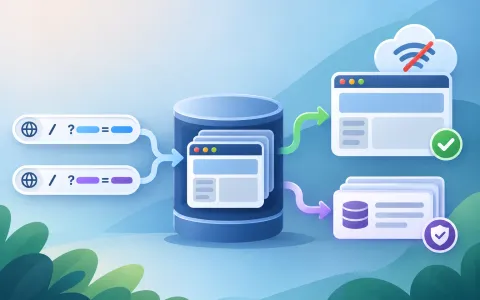
The fetch handler in the fixture only uses the offline fallback for HTML GET requests. That is an important scope limit. The code is not pretending that every request should get a cached response. It is saying that a navigation request can fall back to the current offline page when the network fails, and that fallback must come from the active cache generation. This is where `Cache.match()` matters: it finds the first matching response for the request or URL string and returns `undefined` when no match exists. The active worker can therefore ask the current cache for `offlineUrl` and distinguish “found the current offline page” from “nothing current exists.”
That distinction is safer than searching all caches. Searching all caches turns old generations into accidental fallback sources, which means a newly activated worker can resurrect an obsolete offline page merely because it still happens to exist somewhere. The fixture prevents that by opening only the current cache name in the fallback path. If the current cache lacks the offline page, the code fails instead of silently serving a stale version from a different cache generation. In other words, a missing offline page becomes a visible bug instead of a hidden compatibility trick.
This also keeps the contract narrow enough to reason about. The worker still uses the network first when it can, and the cache only covers the offline navigation case. That is a different decision from stale-while-revalidate, where the point is to return cached content first and refresh it in the background. Here the point is version correctness: if the network fails, the response should come from the current worker's own generation, not from a previous generation that merely survived cleanup.
SourcesMDN: Cache.match() (opens a new tab)MDN: Using Service Workers (opens a new tab)
Activate should delete only obsolete cache names that belong to this app
The cleanup rule in the fixture does not delete every cache in the browser. It deletes only names that start with the app's prefix and do not equal the current versioned cache name. That is the difference between lifecycle cleanup and blanket destruction. If a site uses multiple cache families, perhaps for images, data, or other app shells, they should not all be tied to one release cycle unless the application deliberately owns that relationship. A too-broad deletion rule can erase unrelated caches and create a second outage that has nothing to do with the update itself.
MDN's service worker guide describes `activate` as the place to clean up resources used by previous versions. The fixture translates that guidance into a narrowly scoped selector: keep `app-v2`, delete `app-v1`, and leave `images-v9` alone. That keeps the cleanup honest. It removes the obsolete generation of the same worker while preserving caches that do not belong to that versioned namespace. The app owns the prefix, so the app can decide which names are versioned peers and which names are separate concerns.
The regression test for this behavior is important because the wrong implementation can still look successful in a simple demo. If `activate` deletes by enumerating every cache name, the current app shell might still work in the first navigation, but an unrelated cache family could disappear. The prefix filter proves the more useful boundary: the update system only removes names that it knows it created for its own lifecycle, and it leaves the rest of storage untouched.
What the fixture proves, and what it still leaves to the real browser
The Node tests prove the lifecycle rules that the article is about: the current version has its own cache name, install populates that cache, activate removes only obsolete cache names with the same prefix, and the fetch fallback uses the current cache rather than an older generation. They also prove two negative cases that are easy to miss: a non-HTML request bypasses the offline fallback, and a missing offline page in the current cache fails instead of silently falling back to an old version. Those are the actual correctness boundaries in the application code.
The tests do not prove browser scheduler behavior, service worker registration timing, or that a particular browser will resolve a real network request exactly the same way in every edge case. That is why the article separates the proof boundary from the browser lifecycle. MDN documents the install/activate sequence and `Cache.match()` semantics; the fixture demonstrates how this specific logic behaves when those APIs are supplied. A real service worker should still be run in a browser to verify the integration point, especially if the app also uses navigation preload, `skipWaiting()`, or `clients.claim()`.
That separation is useful because it keeps the claim honest. The article is not saying, “This Node helper is a browser.” It is saying, “This helper shows the application rule that prevents stale cache versions from being served after an update.” Once that rule is clear, the browser-specific part becomes smaller: wire the same logic into install, activate, and fetch, then confirm the current offline page remains resolvable while obsolete versions are removed. The application logic stays the same even if the surrounding service worker registration strategy changes.
SourcesMDN: Cache.match() (opens a new tab)MDN: Using Service Workers (opens a new tab)
Edge cases that make versioned cache cleanup worth the extra structure
Two edge cases show why this pattern is better than an all-purpose cache bucket. First, a service worker update may finish installing while older pages are still open. In that case the older worker still needs its cache until the browser transitions control. If the new worker overwrites a shared cache name too early, the old worker can lose the offline response it still expects to serve. Versioned cache names avoid that collision because each generation owns its own cache until activate retires the old one.
Second, a site can have more than one cache family. A broad delete-by-pattern strategy can accidentally remove a cache that belongs to a different feature, a different asset class, or a different lifecycle. The fixture's prefix filter makes the scope explicit: only caches in the app's own versioned namespace are eligible for retirement. That is a practical limit, not an accident. It keeps cache cleanup from becoming a global broom that sweeps up unrelated data.
The pattern is also valuable when you want failures to be visible. If the current offline page is missing, the fetch fallback rejects instead of falling back to whatever stale content happens to exist. That can look less forgiving, but it is often the safer behavior during development and release rollout. A silent match against an old cache can hide a deployment mistake for days. A failure that points to the missing current offline asset tells you exactly which generation is incomplete. For a versioned service worker, that is usually the healthier outcome.
import assert from "node:assert/strict";
import test from "node:test";
import { createVersionedCacheLifecycle } from "./main.mjs";

class MemoryCache {
  constructor() {
    this.responses = new Map();
    this.addAllCalls = [];
  }

  async addAll(urls) {
    this.addAllCalls.push([...urls]);
  }

  async match(url) {
    return this.responses.get(url);
  }

  put(url, response) {
    this.responses.set(url, response);
  }
}

class MemoryCacheStorage {
  constructor() {
    this.caches = new Map();
    this.deleted = [];
  }

  async open(name) {
    if (!this.caches.has(name)) this.caches.set(name, new MemoryCache());
    return this.caches.get(name);
  }

  async keys() {
    return [...this.caches.keys()];
  }

  async delete(name) {
    this.deleted.push(name);
    return this.caches.delete(name);
  }
}

function htmlRequest() {
  return {
    method: "GET",
    headers: { get: (name) => (name === "accept" ? "text/html" : null) },
  };
}

test("install populates the new version and an offline navigation uses Cache.match after network failure", async () => {
  const storage = new MemoryCacheStorage();
  const lifecycle = createVersionedCacheLifecycle({
    cacheStorage: storage,
    cachePrefix: "app-",
    version: "v2",
    offlineUrl: "/offline.html",
    precacheUrls: ["/", "/offline.html"],
  });

  await lifecycle.install();
  const currentCache = await storage.open("app-v2");
  const offlineResponse = { body: "You are offline" };
  currentCache.put("/offline.html", offlineResponse);

  const response = await lifecycle.respondToFetch(htmlRequest(), async () => {
    throw new Error("network unavailable");
  });

  assert.deepEqual(currentCache.addAllCalls, [["/", "/offline.html"]]);
  assert.equal(response, offlineResponse);
});

test("activate removes obsolete caches for this app but preserves unrelated caches", async () => {
  const storage = new MemoryCacheStorage();
  await storage.open("app-v1");
  await storage.open("app-v2");
  await storage.open("images-v9");
  const lifecycle = createVersionedCacheLifecycle({
    cacheStorage: storage,
    cachePrefix: "app-",
    version: "v2",
    offlineUrl: "/offline.html",
    precacheUrls: ["/offline.html"],
  });

  await lifecycle.activate();

  assert.deepEqual(storage.deleted, ["app-v1"]);
  assert.deepEqual(await storage.keys(), ["app-v2", "images-v9"]);
});

test("a missing current offline response rejects instead of serving an obsolete cache", async () => {
  const storage = new MemoryCacheStorage();
  const oldCache = await storage.open("app-v1");
  oldCache.put("/offline.html", { body: "old offline page" });
  const lifecycle = createVersionedCacheLifecycle({
    cacheStorage: storage,
    cachePrefix: "app-",
    version: "v2",
    offlineUrl: "/offline.html",
    precacheUrls: ["/offline.html"],
  });

  await assert.rejects(
    lifecycle.respondToFetch(htmlRequest(), async () => {
      throw new Error("network unavailable");
    }),
    /Offline response is missing from app-v2/,
  );
});

test("non-HTML requests pass through and do not use the offline fallback", async () => {
  const storage = new MemoryCacheStorage();
  const lifecycle = createVersionedCacheLifecycle({
    cacheStorage: storage,
    cachePrefix: "app-",
    version: "v2",
    offlineUrl: "/offline.html",
    precacheUrls: ["/offline.html"],
  });
  const request = {
    method: "GET",
    headers: { get: () => "application/json" },
  };
  const networkResponse = { body: "network JSON" };

  const response = await lifecycle.respondToFetch(request, async (seenRequest) => {
    assert.equal(seenRequest, request);
    return networkResponse;
  });

  assert.equal(response, networkResponse);
});
SourcesMDN: Using Service Workers (opens a new tab)MDN: Cache.match() (opens a new tab)