Keep keyboard focus inside a confirmation dialog
A native dialog can look modal without behaving that way. Test the keyboard journey from opening a confirmation to cancelling it and returning to the original action.
An archive confirmation sits in the middle of the screen. Its buttons work with a mouse. But after a few presses of Tab, the focus ring appears on a link behind the dialog. The interface still looks like a decision is waiting; the keyboard is already somewhere else.
This walkthrough follows one small task: open the confirmation, choose whether to keep a draft, and get back to the action that opened it. The screenshots come from an original, controlled browser example, not a customer product or usability study. No account is connected and no file is archived.
Follow the focus ring, not the overlay
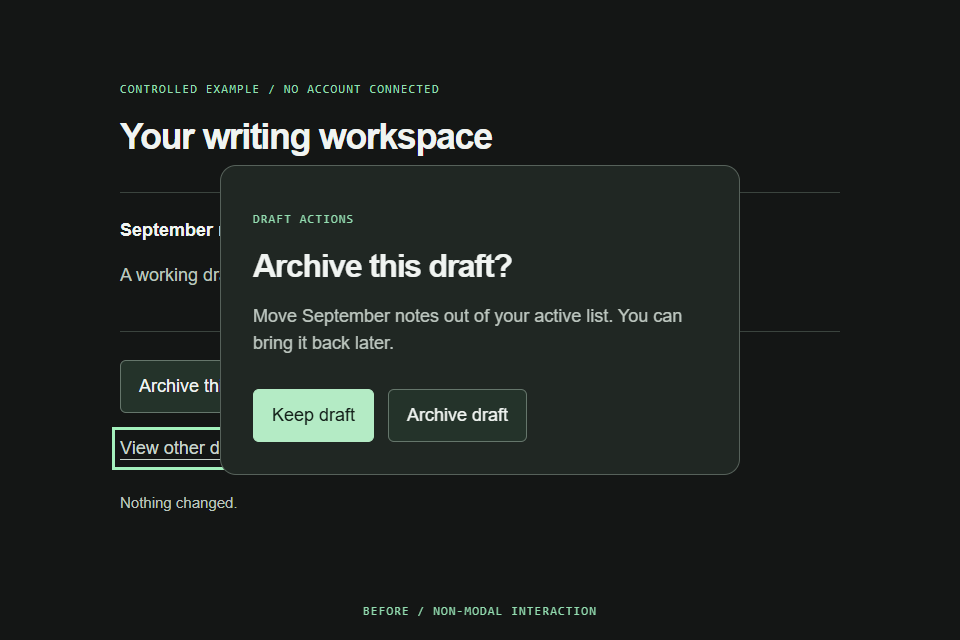
The example has two background controls: Archive this draft and View other drafts. The confirmation has two more: Keep draft and Archive draft. Start on the archive opener with the keyboard and press Enter. In both versions, the initial focus lands on Keep draft. That first impression is not enough to distinguish them.
In the deliberately incomplete version, the opener calls show(). On local Chrome 152.0.7977.83, the subsequent Tab sequence reached Archive draft, a browser focus stop with no element ID, the opener, and then View other drafts. Escape did not close the non-modal dialog. The screenshot captures that background link with a visible focus outline while the confirmation is still open.
A non-modal dialog is not inherently broken. It is wrong for this particular interaction, which asks the person to resolve or dismiss a blocking decision before continuing. The failure is the mismatch between that intended task and the chosen behavior, not the absence of a darker background.
Change the interaction, not just its appearance
Change the opener to showModal(). The browser places the dialog in its modal layer and prevents interaction with the rest of this document. Styling ::backdrop can make that state visible, but styling is not what establishes it. Adding an ARIA attribute or an opaque layer alone would not implement the missing interaction.
The repaired fixture keeps the same content, dimensions, and button order. Its keyboard checks cannot reach either background control while the modal is open, including when the test tries to focus the background link directly. Escape closes it and the original opener regains focus. These are observed outcomes in this fixture, not a claim that every possible dialog implementation has been audited.
// Non-modal: valid for other tasks, wrong for this confirmation.
dialog.show();

// Use this instead for a blocking confirmation.
dialog.showModal();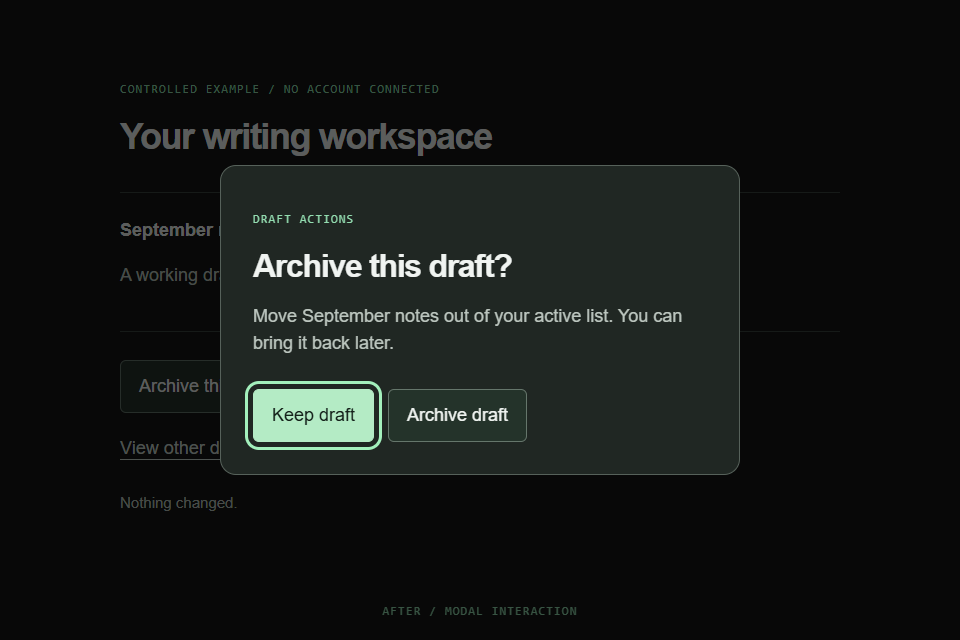
Choose a useful first stop and an obvious exit
Keep draft is the initial target here. It lets someone dismiss the confirmation without performing the action they were asked to consider. That is a deliberate design choice for this example, not a rule that every dialog must start on its cancel button. A long explanation might need a different initial reading position; a data-entry task might start in its first field.
The dialog takes its accessible name from the question heading and its description from one short sentence. The user should not have to infer what will be archived from a button labeled only OK. Both buttons remain visible, so cancelling does not depend on knowing a keyboard shortcut or having a physical keyboard.
The complete markup is below. It uses the native dialog and a form with method="dialog"; the accompanying JavaScript belongs after this markup or in a deferred script. The fixture adds visual styling, but that styling is not required to reproduce the focus behavior.
Complete fixture markup
<button id="open" type="button">Archive this draft</button>
<a id="background" href="#other-drafts">View other drafts</a>
<dialog id="confirm" aria-labelledby="dialog-title" aria-describedby="dialog-description">
  <form method="dialog">
    <p class="eyebrow">Draft actions</p>
    <h2 id="dialog-title">Archive this draft?</h2>
    <p id="dialog-description">Move September notes out of your active list. You can bring it back later.</p>
    <div class="actions">
      <button id="keep" value="keep" autofocus>Keep draft</button>
      <button id="archive" value="archive">Archive draft</button>
    </div>
  </form>
</dialog>
<p id="result" role="status">Nothing changed.</p>SourcesWAI: modal dialog pattern (opens a new tab)MDN: dialog element (opens a new tab)
Treat cancelling and confirming as different outcomes
The example uses the form button values to distinguish Keep draft from Archive draft. A method="dialog" submission closes the dialog without sending a request. The close handler only updates a local status message; this demonstration deliberately has no persistence, authorization, or deletion code.
Reset returnValue each time the opener runs. In the regression test, Archive draft is chosen once, then the dialog is reopened and dismissed with Escape. Without establishing a fresh result for the next opening, code that interprets an old confirmation value can report the wrong outcome. The test checks this sequence explicitly rather than assuming every close means confirmation.
Returning focus also depends on the surrounding page. This fixture leaves the original opener in place, and the browser returns focus to it. If the real action removes that item, choose the next sensible destination in the task and test that separate flow. Do not add a blanket focus call to an element that may no longer exist.
const opener = document.querySelector('#open');
const dialog = document.querySelector('#confirm');
const result = document.querySelector('#result');

opener.addEventListener('click', () => {
  dialog.returnValue = '';
  dialog.showModal();
});

dialog.addEventListener('close', () => {
  result.textContent = dialog.returnValue === 'archive'
    ? 'Draft archived in this demo.'
    : 'Draft kept.';
});SourcesMDN: dialog element (opens a new tab)WAI: modal dialog pattern (opens a new tab)
Test a journey rather than an open attribute
A check that the dialog is visible would pass for both versions. The useful regression begins at the opener, activates it using Enter, follows focus in both directions, dismisses the modal, and verifies where focus ends. The non-modal reproduction is retained so the suite proves it can observe the original failure.
Four local browser tests passed with Node 22.23.2, Playwright 1.58.2, and headless Chrome 152.0.7977.83 on Windows. The width check used 320, 768, and 1440 CSS pixels at 900 pixels high; the comparison captures use 960 x 640. No timing or conversion metric is inferred from those results. CI reruns the same tests with its separately recorded browser version.
| Journey | Observable result |
|---|---|
| Open the non-modal version and tab forward | The background link becomes focused; Escape leaves the dialog open. |
| Open the modal and navigate forward and backward | Neither background control gains focus. Escape closes it and restores the opener. |
| Confirm once, reopen, then press Escape | The second opening reports Draft kept, not the earlier confirmation. |
| Use Keep draft directly | The dialog closes and focus returns to the opener. |
| Open at 320, 768, and 1440 pixels wide | The dialog and its buttons stay within the viewport without page overflow. |
A passing fixture is a starting point for the real screen
Native behavior reduces what this small example has to implement, but it does not certify the surrounding product. The local checks did not cover Safari, Firefox, screen-reader announcements, actual mobile devices, browser zoom, or nested dialogs. Width emulation is not a mobile accessibility test. Repeat the journey on the supported browsers and with the assistive technology relevant to the product before making a compliance claim.
Check the wording in context too. Can someone tell which draft is affected? Is leaving the decision harmless? Does cancelling return them to a useful place? If the action can run without blocking the rest of the task, a modal confirmation may be the wrong pattern altogether.
For a blocking confirmation, the practical acceptance test is simple: start on the real opener, complete both the keep and confirm paths, and reopen after each. The interface is finished only when that whole journey works, not when a centered panel appears.