Why does prepending items change scroll position unless you disable scroll anchoring?
Scroll anchoring keeps the reader’s place when content appears above the viewport. See how a transformed wrapper can suppress that behavior, how `overflow-anchor` changes the contract, and what the same feed looks like before and after the prepend.
A feed that prepends items can feel broken even when the browser is doing exactly what scroll anchoring says it should do. The same content insertion can either preserve the reader’s place or let the viewport move, depending on whether anchoring is active and whether anything suppresses it.
That makes this a CSS debugging problem, not just a property lookup. You need to see which element the browser is trying to keep in view, what change breaks that compensation, and when `overflow-anchor` should opt out instead of the default behavior.
What scroll anchoring is trying to protect
Scroll anchoring tries to keep the reader focused on the same content when layout changes happen above the viewport. In a feed, that usually means inserting a banner or new message does not throw the currently visible messages out of place.
That default is easy to miss because the browser is compensating quietly. If you only look at the DOM after a prepend, you can think the scroll jump is random. The browser is usually reacting to a change in the visible position of an anchor node, then adjusting the scroll offset to keep the reading position stable.
The important distinction is between a browser preserving context and a browser refusing to move. A preserved reading position is the normal benefit of scroll anchoring. A fully static viewport is just one possible outcome, not the contract itself.
That matters when the UI mixes automatic updates with manual reading. A user who has scrolled upward in a chat thread usually wants the same messages to stay visible while new items arrive above. A user who is watching a live status panel may instead expect the newest row to appear and shift the viewport. The same browser rule can be desirable in one case and surprising in the other, which is why the article separates the mechanism from the product decision.
SourcesMDN: Overview of scroll anchoring (opens a new tab)CSS Scroll Anchoring Module Level 1 (opens a new tab)
Compare the anchored and suppressed states at the same viewport
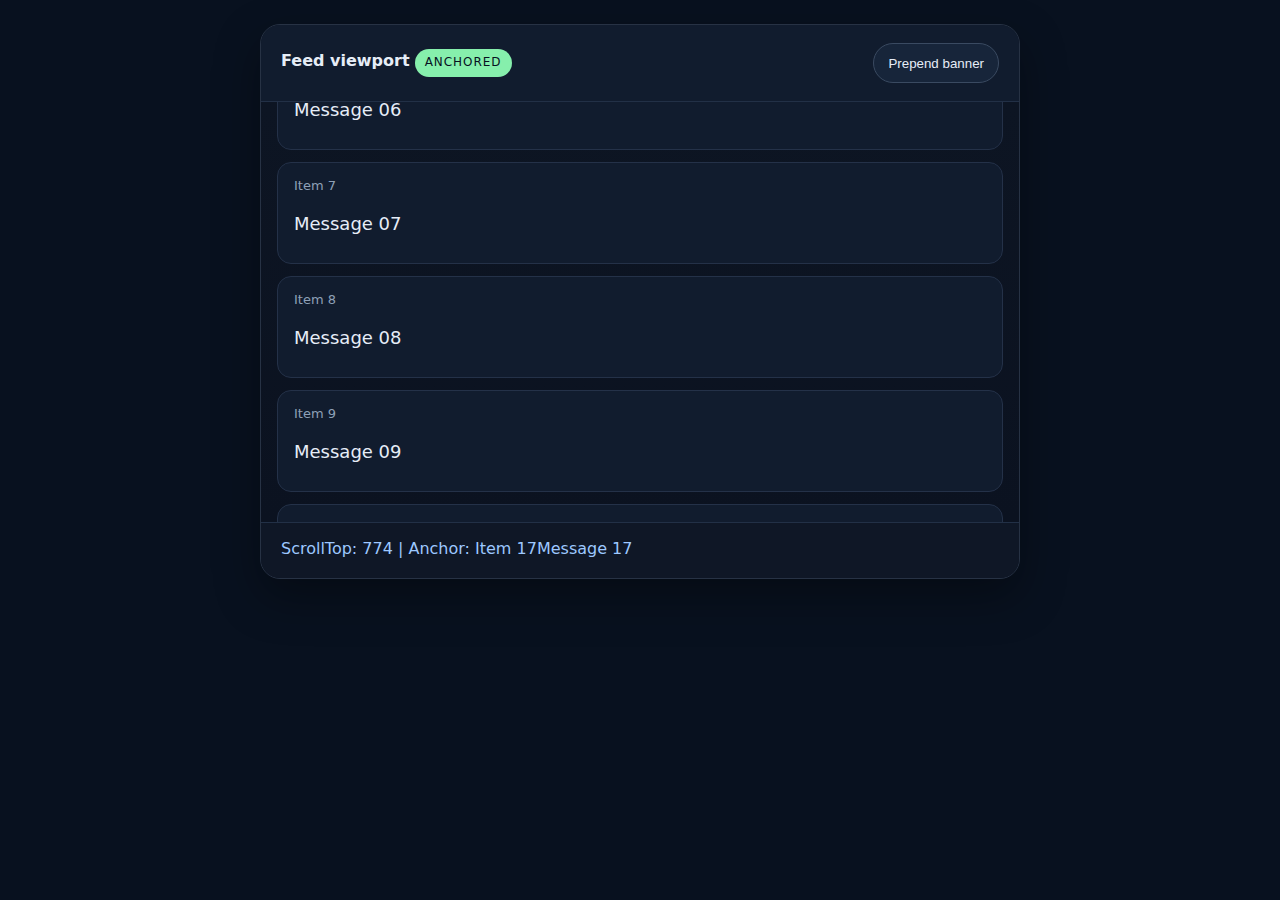
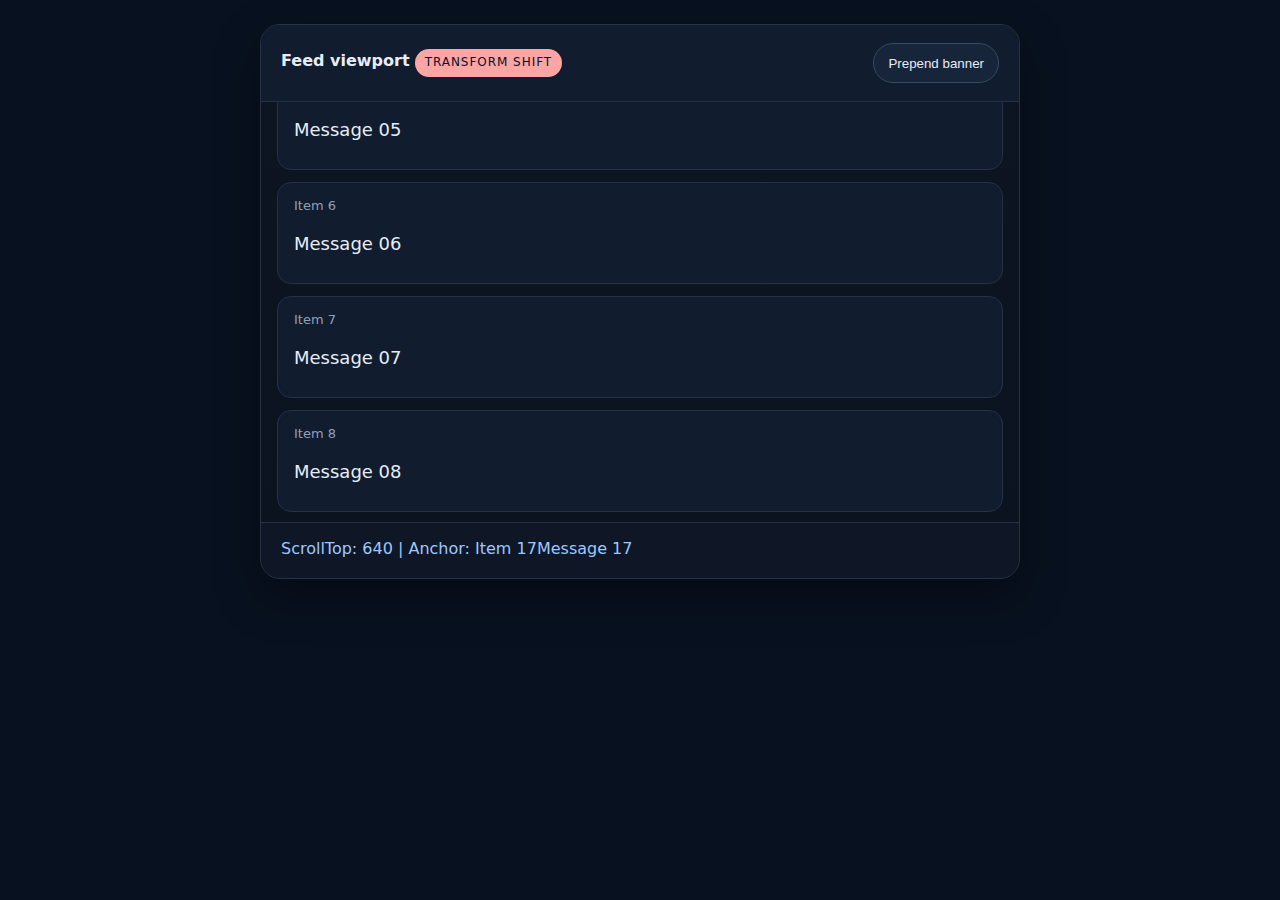
The same fixture shows both outcomes. In the anchored case, prepending a banner increases `scrollTop` so the browser keeps the same part of the feed in view. In the suppressed case, the `transform` change blocks the compensation, so the scroll offset stays put and the visible messages shift.
That comparison matters because the bug is not just 'the page moved.' The bug is that a seemingly harmless wrapper change can change whether the browser is allowed to protect the reader’s place. Once you see the offset difference, the rest of the diagnosis becomes simpler: either you keep anchoring and remove the suppression trigger, or you opt out intentionally with `overflow-anchor` where that behavior is the better fit.
Why a transform can change the result
The browser does not anchor every possible scroll change. The spec and MDN both describe suppression triggers that can temporarily turn scroll anchoring off. A transform change on the relevant chain is enough to alter that behavior.
That is why a wrapper that looks visually harmless can still matter. `transform: translateY(0)` does not move pixels on its own, but it changes the computed style enough to alter whether anchoring is allowed to compensate for the prepend. If the wrapper is also part of an animation or state transition, the suppression can happen right when the feed updates.
The practical lesson is to look for the property change that coincides with the prepend, not just the prepend itself. Scroll anchoring is a browser response to layout instability. If the page changes two things at once, the second change can be the reason the browser stops helping.
A second edge case is an ancestor that already owns a transform for unrelated reasons, such as a card stack animation or a GPU hint added long before the feed update. The browser still sees the changed computation in the same chain, so the compensation can disappear even though nobody touched the list logic. That is the kind of bug a simple 'the prepend moved the page' report will miss.
SourcesMDN: Overview of scroll anchoring (opens a new tab)CSS Scroll Anchoring Module Level 1 (opens a new tab)
When to use `overflow-anchor: none`
If the browser’s default compensation is wrong for your interface, `overflow-anchor: none` is the opt-out. That is useful when a region should not try to preserve the reader’s place, such as a pane whose updates are expected to move the visible content in a controlled way.
Do not use the opt-out just to hide a layout problem. If a prepend or banner makes the feed jump because of an unrelated style change, the better fix is usually to remove the suppression trigger and let scroll anchoring do its job. The property should be a deliberate contract choice, not a cleanup step after a surprise shift.
The edge case to watch is a mixed layout. A feed can contain a region that should anchor and a separate banner, ad slot, or animation layer that should not. In that case, scope the opt-out as narrowly as possible so you do not disable useful compensation everywhere.
Another boundary is testing. A fixture that only clicks a button and inspects the DOM can miss the actual symptom if it does not measure the scroll offset before and after the update. The browser can still be doing something different from what the markup suggests, which is why the regression in this draft records the offset change directly and keeps the screenshots at the same viewport.
| Situation | What you want | Likely choice |
|---|---|---|
| A feed gains content above the viewport while the reader is looking at older items | Keep the same reading position | Leave scroll anchoring enabled |
| A region’s updates should move the visible content in a controlled way | Let the viewport shift instead of compensating | `overflow-anchor: none` |
| A wrapper transform or animation suppresses compensation unexpectedly | Restore the browser’s protection | Remove the suppression trigger before opting out |
What the fixture proves, and what it does not
The local fixture proves that the same prepend can produce two different scroll offsets at the same viewport depending on whether a transform suppression is present. That is enough to explain the mechanism and to write a regression test around it.
It does not prove that every browser version behaves identically, and it does not cover framework-specific list virtualization or accessibility side effects. Those are separate questions. This article is about the CSS behavior at the browser boundary, so the browser test deliberately stays there.
That boundary is the useful one. Once you know whether the browser is anchoring or suppressing anchoring, the remaining work is an implementation choice: remove the accidental suppression, or opt out deliberately where the UI needs a different contract.
In practice, that means a developer can keep one mental model for debugging and a different one for product design. The debugging model asks which computed style change flipped the browser’s behavior. The product model asks whether preserving the reader’s place is more important than allowing the viewport to move. Those are related questions, but they are not the same one.
SourcesMDN: Overview of scroll anchoring (opens a new tab)CSS Scroll Anchoring Module Level 1 (opens a new tab)