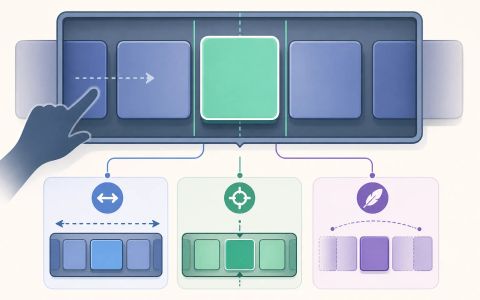
Why doesn't scroll snapping happen — is it the container-type, axis, or snap strictness?
Diagnose scroll snapping by checking the scroll container axis, the child snap alignment, and whether proximity is too soft for the behavior you expect.
A scroll snap demo can fail in ways that all look similar at a glance. The container may never opt in, the axis may not match the motion you are actually creating, or the snap strictness may be soft enough that the browser does not land where you expected. That is why “scroll snapping does not happen” is too broad to be a useful diagnosis on its own.
This article treats scroll snapping as a contract between container and children. The container declares the axis and strictness with `scroll-snap-type`; the children declare landing points with `scroll-snap-align`; `scroll-padding` adjusts the effective landing region but does not create snap points. The helper keeps those responsibilities separate so you can tell which declaration changes the outcome and which one merely looks related.
Start with the three separate contracts
A scroll snap bug is easy to overgeneralize. The surface symptom is simple — the list or carousel keeps scrolling, but it never settles where you expected — yet three different declarations are involved in that behavior. The scroll container opts in with `scroll-snap-type`. The children advertise possible landing points with `scroll-snap-align`. And the chosen strictness decides whether the browser should insist on a stop or merely prefer one when the gesture ends near a target.
That is why a diagnosis has to begin with ownership. `scroll-snap-type` belongs on the scrolling container itself, and it names both the axis and the enforcement mode. `scroll-snap-align` belongs on the children that can be snapped to. `scroll-padding` can shift the effective viewport, and `scroll-snap-stop` can make a snap harder to pass through, but neither one creates a snap target. If the container scrolls normally and never lands, the first mistake may be that the contract was never complete in the first place.
The revised helper in this article follows that order deliberately. It checks whether the container opted in at all, then whether the declared axis matches the motion the interface actually uses, then whether any children exposed snap positions, and finally whether the contract is too soft because it uses `proximity`. That sequence mirrors how a real stylesheet fails: not as one giant “snap broken” state, but as several narrower ways to leave the browser without a clear instruction.
- The container must opt in with `scroll-snap-type`; children still need `scroll-snap-align` so the browser has somewhere to land.
- `container-type: scroll-state` can observe snapping, but it is not the property that enables it.
- `mandatory` is a stronger landing rule than `proximity`, but it does not repair a wrong axis or missing snap targets.
export function diagnoseSnap(containerStyles = {}, childrenStyles = []) {
  const result = { ok: false, issues: [], fixes: [] };

  const rawType = String(containerStyles.scrollSnapType ?? 'none').trim();
  if (!rawType || rawType === 'none') {
    result.issues.push('container-not-opted-in');
    result.fixes.push('Add scroll-snap-type on the scroll container, for example: "scroll-snap-type: x mandatory".');
    return result;
  }

  const [axisToken = 'none', strictnessToken] = rawType.split(/\s+/);
  const axis = axisToken;
  const strictness = strictnessToken ?? 'proximity';

  const parsedChildren = childrenStyles
    .map((child) => {
      const rawAlign = String(child?.scrollSnapAlign ?? '').trim();
      if (!rawAlign) return null;
      const parts = rawAlign.split(/\s+/).filter(Boolean);
      return parts.length === 1
        ? { rawAlign, parts, block: parts[0], inline: parts[0] }
        : { rawAlign, parts, block: parts[0], inline: parts[1] };
    })
    .filter(Boolean);

  if (parsedChildren.length === 0) {
    result.issues.push('missing-snap-align');
    result.fixes.push('Add scroll-snap-align on the snapping children, for example: "scroll-snap-align: center;".');
  }

  const hasAxisMatch = parsedChildren.some((child) => {
    if (axis === 'both') return child.block !== 'auto' || child.inline !== 'auto';
    if (axis === 'x' || axis === 'inline') return child.parts.length === 1 && ['start', 'center', 'end'].includes(child.inline);
    if (axis === 'y' || axis === 'block') return ['start', 'center', 'end'].includes(child.block);
    return false;
  });

  if (parsedChildren.length > 0 && !hasAxisMatch) {
    result.issues.push('axis-mismatch');
    result.fixes.push(`Change the container axis to match the movement you want; the current value "${axis}" does not line up with the child alignments.`);
  }

  if (strictness === 'proximity') {
    result.issues.push('proximity-strictness');
    result.fixes.push('If you need a guaranteed landing, use "mandatory" instead of "proximity".');
  }

  if (result.issues.length === 0) {
    result.ok = true;
    result.message = 'snapping-should-work';
  }

  return result;
}
SourcesMDN: Scroll snap guide (opens a new tab)MDN: scroll-snap-type (opens a new tab)
`container-type` is not the switch that makes snapping happen
A common false lead is to treat `container-type` as part of the snap setup because the words sound related. They are related in usage, but not in responsibility. Container scroll-state queries are a separate feature that can react to scroll state, including whether a container is snapped. Scroll snapping itself still comes from the scroll snap properties. A page can observe snapped state without creating it, and a page can create snapping without using any container queries at all.
MDN makes that dependency explicit: a snapped scroll-state query only evaluates when there is already a scroll snap container ancestor. That means the query observes an existing snap relationship; it does not establish it. So if a demo never lands on a snap position, the first instinct should not be to add `container-type: scroll-state`. The better question is whether the container opted in to snapping and whether the children actually define positions the browser can use.
This separation matters because it keeps the debugging path honest. A scroll-state query is useful when you want descendants to react to the snapped state, such as highlighting the active panel. It is not useful as a substitute for the snap contract itself. If the container-type looks suspicious in a failure, it is usually because it sits next to the real setup, not because it controls the scroll mechanics.
SourcesMDN: Container scroll-state queries (opens a new tab)MDN: Scroll snap guide (opens a new tab)
The axis has to match the motion you are actually creating
The axis is the easiest part of the contract to misread because it is often correct syntactically and wrong behaviorally. A container can declare `scroll-snap-type: x mandatory` and still fail to produce the experience you want if the user is really moving through vertical overflow, or if the visual structure is actually a block-axis list rather than a horizontal track. The browser is obeying the axis it was given, not the axis the layout suggests in prose.
That mistake is especially common when the interface mixes logical and physical thinking. `x` and `y` are physical directions, while `inline` and `block` follow writing mode. A change in writing mode can make the same layout feel like it moved even though the declarations did not. If the snap behavior vanishes after a class change or a writing-mode change, the problem may be that the snap axis no longer corresponds to the scroll movement the element creates.
The helper in this article treats axis mismatch as its own failure because it changes the repair you should try first. If the children already expose valid alignment, changing the axis can fix the layout without touching the items themselves. That distinction matters: the obvious fix is not always “make snapping stronger.” Sometimes the browser is already doing what you asked, and the question is whether you asked in the wrong direction.
SourcesMDN: scroll-snap-type (opens a new tab)MDN: Scroll snap guide (opens a new tab)
Children still have to offer snap positions
A container can be opted in and axis-correct while still having nothing useful to snap to. That happens when the children do not provide `scroll-snap-align`. The browser does not invent snap targets for you. It needs descendants that declare where they can land. Without that declaration, the container can scroll normally, but it has no landing point to resolve against.
This failure is subtle because the page still feels like a scrolling interface. The content moves, the overflow exists, and nothing obviously breaks. What is missing is not scrolling but snapping. Adding a stronger container value cannot compensate for a child that never offered an alignment. Nor does `scroll-padding` create a snap target; it only shifts the region around one that already exists.
The implementation in this article checks for child alignment before it talks about strictness. That order avoids one of the most common incomplete repairs: tightening the snap behavior before confirming that there is anything to snap to. If the children are missing `scroll-snap-align`, the correct next step is not to debate `mandatory` versus `proximity`; it is to give the browser a valid landing point first.
SourcesMDN: Scroll snap guide (opens a new tab)MDN: scroll-snap-type (opens a new tab)
`proximity` is a soft contract, not a guaranteed landing
If the container opts in and the children expose snap positions, the remaining surprise is often strictness. Once an axis is specified, `proximity` is the default snap strictness. That is a valid setting, but it is a weaker promise than many interface designs expect. It means the browser may snap if the end position is close enough to a target. It does not mean every gesture must finish on a target.
That softness is why a scroll snap setup can be technically valid and still feel inconsistent. A carousel that should always settle on one card can feel loose under `proximity`, especially when the gesture ends between candidate positions. Switching to `mandatory` makes the browser insist on one of the available landing points, but it does not repair a bad axis or a missing child alignment. It only strengthens the browser’s choice after the rest of the contract already exists.
This is the point where people most often reach for the wrong conclusion. They see that scrolling happened and assume snapping is broken. In reality, the browser may simply be honoring a permissive contract. The article keeps `proximity` and `mandatory` separate so you can decide whether you need a softer suggestion or a guaranteed landing, instead of treating them as two ways to spell the same behavior.
SourcesMDN: scroll-snap-type (opens a new tab)MDN: Scroll snap guide (opens a new tab)
What the diagnosis function actually checks
The helper in the article is intentionally small. It accepts a container style object and a list of child style objects, then returns a structured diagnosis with `ok`, `issues`, and `fixes`. That shape is useful because it mirrors the decision tree a human follows: did the container opt in, do the children expose snap positions, does the axis line up, and is the strictness soft enough to explain the observed behavior?
The implementation is a heuristic, not a full CSS parser. It recognizes the common `scroll-snap-type` values needed for the article and the basic `scroll-snap-align` forms that matter in the examples. That is enough for a regression test that teaches the contract boundary. It is not trying to model every keyword combination or every browser nuance. The goal is to isolate the failure class, not to prove the browser’s entire scroll engine.
That narrowness is also why the article can be honest about what the code does not prove. The browser still owns the final snap decision in a real layout. The helper only verifies the declarations you control. That boundary is the useful one for a debugging article, because it tells the reader which edit changes the state from ambiguous to valid and which edit merely looks plausible without addressing the cause.
SourcesMDN: Container scroll-state queries (opens a new tab)MDN: Scroll snap guide (opens a new tab)
Keep the limits visible: this diagnosis is narrow on purpose
This article is intentionally not a general scroll tutorial. It answers one question: which part of the scroll snap contract failed? That narrow focus is what makes the repair useful. A reader who is debugging a broken carousel does not need a catalog of every overflow property first; they need a way to tell whether the container never opted in, the axis was wrong, the children never offered positions, or the strictness was softer than the interface required.
There are still important edge cases outside the helper’s small model. Logical axes such as `inline` and `block` matter when writing mode changes the direction that should be treated as the primary scroll axis. A child can also declare more than one alignment value, which means a real browser may have more nuance than a compact diagnostic can encode. Those cases are worth remembering because they explain why a heuristic should be treated as a guide, not a spec replacement.
The broader boundary is browser behavior itself. Scroll snapping sits at the intersection of layout, overflow geometry, and input handling. The article can explain how the declarations relate, and the helper can check whether they agree, but the application still owns the actual scroll container and the surrounding interaction design. If snapping still feels wrong after the contracts are correct, the next thing to inspect is usually the real scroll boundary, the available overflow, and whether another wrapper changed the element the browser is actually snapping.
- A successful diagnosis does not prove that the page will feel good at every viewport; it only proves that the scroll snap declarations are internally consistent.
- The helper does not replace browser testing. It checks declaration relationships, not momentum, pointer input, or exact snap physics.
- Two practical limits remain: logical axis changes can alter the outcome, and scroll-state queries can observe snapping without creating it.
import test from 'node:test';
import assert from 'node:assert/strict';
import { diagnoseSnap } from './main.mjs';

test('success: mandatory container with aligned children', () => {
  const result = diagnoseSnap(
    { scrollSnapType: 'y mandatory' },
    [{ scrollSnapAlign: 'center' }, { scrollSnapAlign: 'start' }],
  );

  assert.equal(result.ok, true);
  assert.equal(result.message, 'snapping-should-work');
  assert.deepEqual(result.issues, []);
  assert.deepEqual(result.fixes, []);
});

test('failure: wrong axis does not match child alignment', () => {
  const result = diagnoseSnap(
    { scrollSnapType: 'x mandatory' },
    [{ scrollSnapAlign: 'center start' }],
  );

  assert.equal(result.ok, false);
  assert.deepEqual(result.issues, ['axis-mismatch']);
  assert.match(result.fixes[0], /axis/);
  assert.match(result.fixes[0], /x/);
});

test('failure: proximity is a softer strictness', () => {
  const result = diagnoseSnap(
    { scrollSnapType: 'y proximity' },
    [{ scrollSnapAlign: 'center' }],
  );

  assert.equal(result.ok, false);
  assert.ok(result.issues.includes('proximity-strictness'));
  assert.ok(result.fixes.some((fix) => fix.includes('mandatory')));
});

test('boundary: no scroll-snap-type means the container was never opted in', () => {
  const result = diagnoseSnap({}, [{ scrollSnapAlign: 'center' }]);

  assert.equal(result.ok, false);
  assert.deepEqual(result.issues, ['container-not-opted-in']);
  assert.ok(result.fixes[0].includes('scroll-snap-type'));
});
SourcesMDN: scroll-snap-type (opens a new tab)MDN: Scroll snap guide (opens a new tab)MDN: Container scroll-state queries (opens a new tab)


