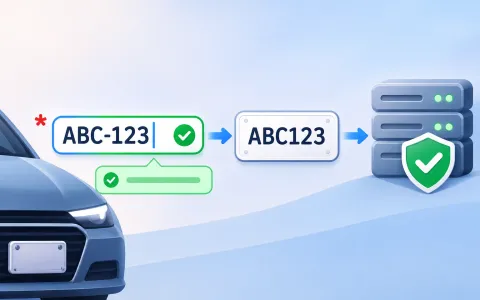
Validate a required license plate field
Accept common license-plate punctuation on the client, normalize to one stored form, and keep accessible inline feedback while server checks still enforce the final rule.
A license-plate field is a good test of whether form validation is helping people or merely enforcing a style preference. If the user types the right characters with the wrong separator, the interface should guide them instead of punishing them. The trick is to combine a clearly required field, forgiving pattern handling, and concise feedback that says how to fix the value.
This article uses a small client-side helper to show the difference between validation and normalization. The browser can signal that the field is required, the script can accept common punctuation variants, and the server still needs to repeat the rule before it trusts the submission.
Make the field required without making it brittle
A license-plate field usually has two jobs that are easy to confuse. First, it must be visibly required so people do not miss it. Second, it must accept the same real-world plate value even when the person types a separator differently than your storage format expects. Those are different problems. One is about making the obligation visible; the other is about not turning a harmless formatting difference into a false error.
The supplied fixture keeps those responsibilities separate. The field is marked as required, so the browser can communicate that omission before submission. At the same time, the validator accepts a narrow family of common separators between the plate groups and then normalizes the accepted value into a canonical storage form. That means the interface can be forgiving while the saved value remains predictable.
That approach fits the W3C guidance for form validation. Required controls should be clearly identified, and validation should be as accommodating as possible when different notations represent the same underlying value. The important design choice is not to treat the user’s punctuation as the meaning of the plate. The plate’s structure matters; the separator is just the path they used to enter it.
- The input is required, but the user should not be punished for harmless punctuation differences.
- Client-side feedback is a usability aid, not the authority that keeps the system safe.
// This client-side helper accepts the documented German-style plate groups:
// city (1–3 letters), letters (2–4), and digits (1–4).
// It tolerates spaces, hyphens, periods, and slashes between groups.
export const plateField = Object.freeze({
  label: 'License plate (required)',
  attributes: Object.freeze({
    required: true,
    // Suitable for an HTML pattern attribute; normalization still supplies the
    // canonical value used by the application.
    pattern: '[A-Za-z]{1,3}\\s*[-./ ]+\\s*[A-Za-z]{2,4}\\s*[-./ ]+\\s*[0-9]{1,4}',
    ariaDescribedBy: 'plate-feedback'
  })
});

const plateGroups = /^\s*([a-z]{1,3})\s*[-./ ]+\s*([a-z]{2,4})\s*[-./ ]+\s*([0-9]{1,4})\s*$/i;

/**
 * Returns a canonical, storage-friendly plate or null when the format is not
 * one of the supported group layouts.
 */
export function normalizePlate(value) {
  if (typeof value !== 'string') return null;

  const match = value.match(plateGroups);
  if (!match) return null;

  return `${match[1].toUpperCase()} ${match[2].toUpperCase()} ${match[3]}`;
}

/**
 * Produces concise inline feedback suitable for updating an aria-describedby
 * message while the person types. Server-side validation must repeat any
 * validation required for accepting a submission.
 */
export function validatePlateInput(value) {
  if (typeof value !== 'string' || value.trim() === '') {
    return {
      valid: false,
      normalized: null,
      feedback: 'Enter a license plate; this field is required.'
    };
  }

  const normalized = normalizePlate(value);
  if (normalized === null) {
    return {
      valid: false,
      normalized: null,
      feedback: 'Use 1–3 letters, 2–4 letters, and 1–4 digits, separated by spaces, hyphens, periods, or slashes.'
    };
  }

  return {
    valid: true,
    normalized,
    feedback: `Plate format looks good: ${normalized}.`
  };
}
SourcesW3C WAI Forms Tutorial: Validation (opens a new tab)W3C WAI Forms Tutorial: Notifications (opens a new tab)
Normalization is more useful than a strict string match
The validator in the example does not merely check whether the string looks valid. It also converts an accepted value into a storage-friendly form. That is the part that makes the UX feel tolerant instead of merely permissive. If the user enters `b-ab/123`, the field does not reject the value because the dash and slash are not the exact spacing you imagined. It recognizes the groups, uppercases the letters, and returns `B AB 123` as the canonical version.
That distinction matters because a strict pattern check alone can create needless friction. If every accepted separator must exactly match the same punctuation and spacing, users who copy a plate from a document, a photo, or memory may be blocked for reasons that have nothing to do with the actual license-plate data. For plate entry, people often know the characters but not the exact presentation. A validator that tolerates common separators reduces that cost.
Normalization also keeps the application honest about comparison. Once the plate is converted to one canonical representation, downstream code no longer has to compare half a dozen spelling variants. That helps prevent accidental mismatches later when you search, deduplicate, or confirm that a previously entered plate already exists.
- Normalize accepted variants into one canonical value before the application stores or compares it.
- Do not ask the server to interpret multiple ad hoc spellings if the client can do that predictably.
Give short correction guidance while the user is typing
The example returns a compact feedback message on every validation pass, which is exactly the kind of feedback W3C recommends for in-line messaging. The message is not a generic failure banner. It is tied to the input through `aria-describedby`, so the user can hear or read the guidance in the same place they are editing.
That matters because the user is not only asking, “Is this wrong?” They are asking, “What should I do next?” The messages in the fixture answer that question directly. When the field is empty, the message says the field is required. When the format is wrong, the message tells the user which group pattern is expected and which punctuation styles are acceptable. When the value is acceptable, the message confirms the canonical form that will be used.
This kind of feedback is most helpful when the interface updates it as the user types, but it should stay concise. Long explanations become noise if they appear on every keystroke. A good inline message gives just enough guidance to move the person forward without forcing them to leave the field or decode a paragraph of policy before they can continue.
- Inline feedback should be short enough to read while typing.
- The message should explain how to fix the input, not merely label it as wrong.
SourcesW3C WAI Forms Tutorial: Notifications (opens a new tab)
Client-side validation helps completion, but the server still decides
A common mistake is to treat client validation as if it were the gatekeeper for the whole workflow. It is not. The browser can help users notice missing required input, and it can provide immediate feedback for obviously malformed values, but it cannot be the only enforcement layer. The W3C tutorial says this directly: client-side validation improves the experience, but data still needs to be validated on the server side.
That separation is important even in a small field like a license plate. A user may have JavaScript disabled, a browser may not support the specific validation behavior you expected, or the request may be altered before it reaches your backend. If the server accepts whatever the client declared valid, then the application has no real boundary at all. The client becomes a hint, not a rule.
The right mental model is that the client helps people succeed sooner. It reduces avoidable submission failures, explains the format in the same moment the person is entering it, and avoids punishing harmless punctuation differences. The server then repeats the authoritative check and decides whether the submitted value actually belongs in the system. That division is what makes the interface both humane and trustworthy.
- Browser validation can catch missing required values, but it does not know your full business rule.
- Server-side validation still has to repeat the rule because client-side checks can be bypassed or unsupported.
SourcesW3C WAI Forms Tutorial: Validation (opens a new tab)W3C WAI Forms Tutorial: Notifications (opens a new tab)
Keep the accepted pattern narrow enough to explain
The example supports one specific family of plate values: one to three letters, then two to four letters, then one to four digits, with separators that may be spaces, hyphens, periods, or slashes. That makes it a useful teaching example because the rule is concrete enough to test and to explain. It is not a claim that all jurisdictions share the same plate structure.
That limitation matters. If your product serves many regions, a single hard-coded pattern can quickly become the wrong abstraction. Some plates contain different groupings, optional prefixes, localized scripts, or other symbols that a simple pattern would reject. In those cases, the right solution may be a region-aware format selector, a different normalization strategy, or a looser client-side hint that defers the authoritative rule to the server.
The important design lesson is that accessibility and forgiveness are not the same as vagueness. A better field does not have to accept everything; it has to accept the expected variations that are genuinely harmless, and it has to tell the user how to correct the rest. The narrower the supported format, the easier it is to keep that promise without creating false confidence.
- Not every license-plate rule should be handled with a free-form regex.
- The example is intentionally narrow so its limits are visible.
SourcesW3C WAI Forms Tutorial: Notifications (opens a new tab)W3C WAI Forms Tutorial: Validation (opens a new tab)
What the fixture proves, and what it leaves to the real form
The supplied functions show the behavior that matters for this UX decision. `validatePlateInput()` returns a valid result and a canonical plate for common separator variants, returns a missing-field message for blank input, and returns a format hint when the structure is wrong. `plateField.attributes.required` also makes the requirement explicit in the field metadata. Those outputs are enough to prove the message design, the normalization rule, and the tolerant parsing strategy in a small, controlled example.
What the fixture does not prove is equally important. It does not prove that the browser will style the control exactly the same way in every environment, because that depends on native form behavior and the surrounding UI. It does not prove that a server will accept the normalized value, because the server must implement the same rule independently. And it does not prove that a broader regional plate policy fits into this exact parser, because the example intentionally models one narrow format.
That boundary is useful rather than a weakness. A small form validator should be judged on whether it improves the person’s ability to finish the task, whether it explains the next correction clearly, and whether it avoids false rejections for formatting differences that do not change the meaning of the value. This fixture demonstrates those goals without pretending that the browser is the only place validation belongs.
- The tested helper returns a stable object shape for valid and invalid inputs.
- The missing-value and bad-format paths are both part of the user experience, not just edge cases.
import test from 'node:test';
import assert from 'node:assert/strict';
import { plateField, validatePlateInput } from './main.mjs';

test('accepts common separator variants and returns a canonical plate', () => {
  const result = validatePlateInput('b-ab/123');

  assert.deepEqual(result, {
    valid: true,
    normalized: 'B AB 123',
    feedback: 'Plate format looks good: B AB 123.'
  });
  assert.equal(plateField.attributes.required, true);
});

test('reports a missing required plate with correction guidance', () => {
  const result = validatePlateInput('   ');

  assert.deepEqual(result, {
    valid: false,
    normalized: null,
    feedback: 'Enter a license plate; this field is required.'
  });
});

test('rejects a plate whose middle letter group is too short', () => {
  const result = validatePlateInput('B-A-123');

  assert.deepEqual(result, {
    valid: false,
    normalized: null,
    feedback: 'Use 1–3 letters, 2–4 letters, and 1–4 digits, separated by spaces, hyphens, periods, or slashes.'
  });
});
SourcesW3C WAI Forms Tutorial: Notifications (opens a new tab)W3C WAI Forms Tutorial: Validation (opens a new tab)